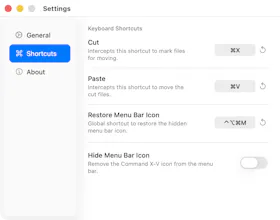
Command X-V is a free, open-source macOS utility that implements standard ⌘X cut and ⌘V paste keyboard-driven file operations directly in Finder. It is context-aware—automatically detecting active text fields to prevent input conflicts—and runs completely invisibly in the background. Built strictly with privacy in mind, it operates entirely offline with zero telemetry or tracking. Available as a code-signed and notarized Universal Binary (macOS 13+).
No reviews yetBe the first to leave a review for Command X-V
Maker
📌
Hey Product Hunt 👋
I built Command X-V because moving files around on macOS has always felt like a second-class, click-heavy experience for keyboard-driven users.
While macOS natively supports standard copying and pasting with ⌘C and ⌘V, it has never provided a native keyboard shortcut for "cutting" files directly in Finder. Power users are forced to copy with ⌘C and remember to use the awkward ⌘⌥V combination to move. I wanted to make file operations feel standard, native, and easy.
Command X-V brings true ⌘X Cut and ⌘V Paste to files in Finder. It's smart and context-aware—automatically detecting active text fields (like file renaming or search inputs) to prevent conflicts, so ⌘X functions normally on text when you need it to.
The utility is built with AppKit and pure Swift to run completely invisibly in the background. It has an option to hide the menu bar icon entirely, keeping your workspace clean, while a global hotkey (⌃⌥⌘M) restores the settings at any time.
It has a total commitment to privacy: there is absolutely no telemetry, no tracking, and it operates entirely offline. It's packaged as a code-signed, notarized Universal Binary supporting macOS 13 Ventura or later.
I'd love feedback from macOS power users, keyboard enthusiasts, and anyone who wants to improve their desktop productivity. What features or improvements would you like to see next?