
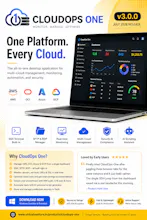
CloudOps-One is an all-in-one desktop platform for managing AWS, OCI, Azure, and GCP from a single dashboard. Monitor infrastructure, launch SSH sessions, automate tasks with AI, manage files, optimize cloud costs, and strengthen security—all without switching between multiple tools. Built for DevOps, SREs, System Administrators, and Cloud Engineers to simplify daily cloud operations.


Free Options
Launch Team / Built With


Tines The single, secure environment for agents, apps, and automations.
Promoted
How does the AI scripting handle permissions across different cloud providers without stepping on IAM policies already in place?
@suat6eob The AI Script Generator in CloudOps One doesn't interact with cloud IAM policies at all — it's purely a script generation tool, not an execution engine with its own identity.
Here's how it works:
What the AI module does:
Takes a user prompt (e.g., "create a backup script for MySQL on Ubuntu")
Sends it to OpenAI/Google/Claude API
Returns a shell script in the editor
User reviews, edits, then optionally runs it via SSH on a target server
Why it doesn't conflict with IAM:
It generates code, it doesn't execute cloud API calls directly
When scripts run, they execute under the SSH user's Linux permissions on the remote server
For cloud CLI commands (aws, oci, gcloud), the script uses whatever IAM role/credentials are configured on that server — not the app's stored credentials
The app's stored credentials (used for Resource Explorer, Compute, Cost, etc.) are separate and read-only by default
Permission boundaries:
AWS SDK calls from the app use the access key you provided — if that key only has ec2:Describe* and ce:GetCostAndUsage, the app can't modify anything
SSH scripts run with whatever sudo/user permissions that SSH user has on the server
There's no cross-contamination between the app's API credentials and what scripts do on servers
So essentially — the app respects whatever IAM policies are already in place. It can only do what your credentials allow. The AI just helps you write scripts faster.
Yes — Phase 3 (v2.2.0) has the AI Cloud Copilot planned, which would go beyond just generating scripts
How does the AI scripting actually decide what counts as safe to run across different cloud providers without stepping on IAM boundaries you already have set up?
@epevlivan73045 The AI scripting doesn't make safety decisions on its own — it relies on multiple layers:
Layer 1: AI only generates, human decides
AI produces a script → user reads it → user clicks Run
No auto-execution. Every command requires manual click
Layer 2: SSH user permissions
Scripts run under whatever Linux user you SSH as (ubuntu, opc, ec2-user)
If that user can't sudo, destructive commands fail at the OS level
The app doesn't elevate privileges beyond what the SSH session has
Layer 3: Cloud API credentials are separate
AI-generated scripts run via SSH (OS-level)
Cloud API calls (Start/Stop EC2, Snapshots) use your stored access keys
If your IAM policy is read-only, the app can't modify anything via API — it just gets "AccessDenied"
Layer 4: Approval gates (Phase 5)
Workflows with requireApproval: true pause and show a confirm dialog
Terraform actions show terraform plan output before you approve apply
Layer 5: What the AI is told NOT to do
System prompt says: "provide commands, don't auto-execute"
It never calls cloud APIs directly — only suggests commands for the user to review
What it does NOT do:
No pre-validation of IAM policies before running (doesn't check "will this succeed?")
No sandbox/dry-run for SSH commands
No rollback if a script partially fails mid-way
Bottom line: The AI is a suggestion engine. Your IAM policies, SSH user permissions, and manual approval are the actual safety boundaries. The app can only do what your credentials allow.
How does the AI scripting actually work in practice — is it generating commands that run across all four clouds, or do you have to pick one provider at a time? Curious how it handles things that are very different across AWS and OCI, like IAM vs IAM policies.
@nerminaydao7wn AI generates Linux scripts per server, not cloud API calls. You pick a target server, it adapts to that OS (Ubuntu/RHEL/Oracle Linux). Cloud-provider-specific actions (Start/Stop/IAM/VPC) are handled by the app's built-in SDK modules — not AI. The AI is your script writer, the app is your cloud controller.
finally a single window for managing all my cloud accounts without the constant tab switching. the AI scripting piece saved me from digging through docs for a stubborn IAM policy
@ksulunhat56036 That's exactly the value prop — one pane of glass for AWS/OCI/Azure/GCP, and the AI Copilot acts as your on-demand cloud consultant. No more context-switching between 4 consoles or searching Stack Overflow for the right IAM syntax.
finally something that lets me skip the constant tab switching between aws and gcp consoles. ssh straight from the dashboard actually worked without any weird setup, which was a nice surprise
@tahsin7mio Yes, all confirmed working. AWS + GCP accounts in one dashboard, SSH connect directly from discovered instances — no manual config needed. The app auto-creates the session with the right IP/username when you click "SSH Connect" on any cloud instance.
Finally tried Cloudops-one after juggling three browser tabs for the same instance and it just feels calmer. The single SSH jump from the dashboard saved me a real headache this morning.
@ilankagzmaoonx Yes — that's exactly what's built. Click any instance in Compute Explorer → "SSH Connect" button → opens terminal directly. No copying IPs, no opening PuTTY separately, no juggling tabs. One click from cloud dashboard to live terminal.