
Clipbus
The keyboard-first clipboard manager you can program
17 followers
The keyboard-first clipboard manager you can program
17 followers
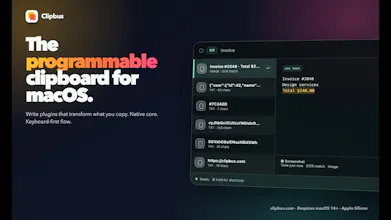
Clipbus is a native, keyboard-first clipboard manager for macOS that you can program. Search history—including OCR text—with structured filters, use 14 built-in actions, or write Node.js detectors, renderers, and actions for workflows like JWT decoding. Action results can feed the next step, chaining text, image, and file operations without leaving the keyboard. Free: 500 items and 3 plugins per type. Pro is $19 once with E2EE Cloud Sync. Requires macOS 14+ on Apple Silicon.


Free Options
Launch Team / Built With


Describe your app. Get clickable screens, flowcharts and mind maps.From “what if” to “here’s how it works” in one prompt.
Promoted
Hi Product Hunt — I'm Junren Wong, the solo developer behind Clipbus.
I didn't build Clipbus because the world needed “one more clipboard manager.” There are already many excellent options: some have beautiful interfaces, while others provide useful actions and automation. The problem was more personal.
I'm a very keyboard-heavy user. I rely on search and shortcuts for almost everything, and Raycast is one of the desktop tools I use most. Most of the time, I use it to launch apps and access clipboard history.
I really like Raycast, but clipboard management is one part of a much broader product. Its strengths and ambitions go far beyond the clipboard. For someone like me, whose daily workflow depends heavily on copying, finding, transforming, and pasting information, its clipboard experience never quite became the tool I wanted.
Dedicated clipboard managers did not fully fit either. Some were more visual or mouse-driven than I preferred, while others offered useful built-in actions but limited ways to adapt them to my own workflows.
That is why I started building Clipbus: a modern, keyboard-first clipboard with a programmable plugin system. Instead of trying to predict every workflow and adding every possible feature to the app, I want Clipbus to provide a foundation that people can extend for themselves.
AI coding makes this direction much more practical. Developers can write plugins directly, while others can use AI and reusable skills to create a starting point for their own workflows.
I also don't think AI makes foundational productivity tools unnecessary. AI can automate and generate a lot, but we still constantly copy, search, organize, transform, and reuse information. Good tools for these small, repeated interactions still matter.
Clipbus began as the clipboard I wanted for myself. The core experience is free to use; Pro is a one-time $19 purchase for higher limits and E2EE Cloud Sync. It requires macOS 14+ on Apple Silicon.
Plugin docs: https://clipbus.com/plugin-doc
Open-source example: https://github.com/scubers/awesome-clipbus-plugins
What is the repetitive thing you most often do immediately after copying something?
Finally a clipboard manager that feels like it respects my keyboard. The detector system is wild, I hooked up a JWT decoder in a few minutes and it just fits into the search flow. Solid work.
@utilitypro Thank you — this is exactly the kind of workflow I hoped Clipbus would make possible. I didn’t want actions to feel like a separate toolbox; the goal was to keep detection, search, and transformation in one keyboard flow. JWT decoding is a perfect example. I’d love to hear what detector or action you end up building next.
The real device preview: