
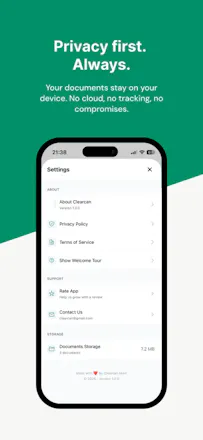
Clearcan is a document scanner built on a simple idea: scanning should take seconds, not a subscription. Scan with automatic edge detection, search documents by their content (on-device text recognition in English, Russian, Romanian), copy text from any page, and export clean PDFs — no watermarks, no limits. Everything runs on your iPhone. No ads, no accounts, no analytics, no cloud. Built by an indie developer tired of scanner apps stuffed with paywalls.



Maker
📌Hi! I'm Ion, the developer. I built Clearcan because every scanner app I tried interrupted a 10-second task with ads or a paywall.
The recent update added text recognition that runs fully on device (Apple's Vision framework) — so you can search scans by their content and copy text from them, and your documents still never leave your phone.
It's free, and staying free. Happy to answer anything!
Report

How does the on-device text recognition hold up with longer or handwritten documents, and is there any plan to support more languages beyond English, Russian, and Romanian down the line?
Report
Maker
@basogulgon30432 Hi! Long documents are fine — recognition runs per page at save time, around half a second each, so a 20-page contract is no different from a single receipt. Handwriting is weak, as I told Rabia above — printed text is where it shines.
On languages: English, Russian and Romanian are what I actively tested (including Romanian diacritics). Apple's on-device models cover many more, so I'm planning to test and enable additional ones — if you tell me which language you need, I'll prioritise it.
Report

How does the on-device text recognition handle handwritten notes or low-quality photos with shadows, or is it strictly for clean printed pages?
Report
Maker
@rabia597613 Hi Rabia! It uses Apple's Vision framework on-device, so printed text — including crumpled receipts, shadows, odd angles — is handled well. Handwriting is the honest weak spot: block letters sometimes work, cursive mostly doesn't.
Report


the "everything stays on your phone" pitch is great until you factor in what happens when the phone dies or gets replaced. no cloud is a real privacy win but it also means no cloud backup by default, is there any local export/backup path (iCloud folder, encrypted file, anything) so a lost phone doesn't mean losing every scanned document, or is that an intentional tradeoff you're fine with?
Report
Maker
@galdayan Fair point, and an honest gap. Right now it's manual: any document exports to PDF via the share sheet, and from there you can Save to Files — which can live in iCloud Drive if you want. So you can back things up, but only if you remember to.
A proper local backup is on my list — one file you own, saved wherever you like. Still no cloud, still no account. I'm building this step by step.
Thanks for the push!
Report
@ion_hortolomei 'saved wherever you like, no cloud, no account' is the right shape for the backup feature too, keeps it consistent with everything else you've built. building it step by step instead of bolting on a cloud sync to solve it fast is the harder but more honest path.
Report
Maker
@galdayan Yeah, that's the plan. Backup will just be a file you own — no server, no account.
Report
@ion_hortolomei that's exactly the right shape - a file you own beats an account you have to trust. good luck shipping it, will keep an eye out for the update.
Report

Love the no-subscription stance, that's a breath of fresh air for scanner apps. One thing that would make this a daily driver for me: support for splitting a multi-page scan into separate documents automatically, or at least let me reorder and delete pages right inside the app before exporting the PDF.
Report
Maker
@irmak2070596 Hi Irmak! Deleting pages actually already works — tap the trash icon on any page, both while scanning and inside a saved document.
Reordering is genuinely missing and it's next on my list. Splitting one session into separate documents is a good idea too — noted. Thanks, this is the useful kind of feedback.
Report

Scanned a few receipts and the edge detection picked everything up perfectly without me adjusting anything. The on-device search actually finds text in old Russian documents I had, which is a first for me.
Report
Maker
@sabriboruc9hqs Hi! Actually Cyrillic was the whole reason I went with Apple Vision instead of ML Kit — ML Kit still doesn't do Cyrillic at all. Good to hear it works on your real documents)
Report

Downloaded this on a whim and genuinely surprised by how fast the edge detection works, even on crumpled receipts. The on-device text search is what sold me though, finding an old contract in seconds without it leaving my phone.
Report
Thank you for app review) Here i built the app I was looking for myself: point, scan, get a PDF. That's it.
Two notes about improvements: expanding languages actually costs nothing in binary size — Vision's models ship with iOS, not with the app (that's exactly why I picked it over ML Kit, which does bundle models and still has no Cyrillic). So more languages are mostly a matter of testing, and that's on my list.
Your point about memory on multi-page batches with older hardware is the sharp one — I'll test that properly.
Thanks again for the feedback!