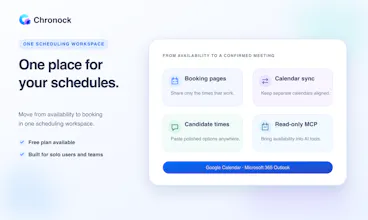
Chronock combines scheduling and cross-calendar sync in one workspace. It checks availability across connected Google and Outlook calendars, turns open time into a booking page, and syncs events between work, personal, and project calendars to prevent double bookings. Guests see only bookable times, while you can review every connected event in one Integrated Calendar. Start free with no credit card.
I’m Takahiro Ikeuchi, a solo product engineer from Tokyo 🗼 and the maker of Chronock.
I started building Chronock after repeatedly running into the same problem in two different roles.
As a CTO, I spent a lot of time coordinating recruiting interviews. As a coach, I also needed to schedule meetings with people outside my organization. Native calendar features often felt too limited, while broader scheduling suites could be difficult to justify on price. At the same time, keeping my work, personal, and project calendars aligned often meant paying for and managing another tool.
That led me to a simple idea: scheduling and calendar sync are not really separate problems. They are both about keeping your availability trustworthy.
Chronock brings them together in one workspace:
- Create booking pages that check your Google and Outlook calendars
- Sync events between work, personal, and project calendars
- Review connected events in one Integrated Calendar
- Find and share open-time candidates when a booking link is not the right fit
As a Japanese maker, I also wanted multilingual support—including Japanese—to be part of the product from the beginning, rather than an afterthought.
I wanted to create a focused and accessible utility without treating quality as optional.
I’ve spent more than 10 years working as a full-stack engineer and now describe myself as a product engineer. I’m interested in the entire process, from UI design and frontend development to backend systems and cloud infrastructure.
Chronock is built AI-natively. I use coding agents such as Codex and Claude Code throughout development, but I don’t equate AI-native development with handing off engineering judgment. Architecture, design, security, testing, and the final quality bar still require deliberate care.
For me, the real value of AI is not only speed. It helps a very small team avoid unnecessary compromises and stay close to the people using the product.
Chronock is still at an early stage, and this launch is an opportunity to learn. There’s a free plan, and no credit card is required.
I’d especially love your feedback:
- What is the hardest part of managing multiple calendars today?
- Do you prefer sharing a booking link or proposing a few specific times?
- Is anything about Chronock’s setup or positioning unclear?
Thank you for taking a look. I’ll be here throughout the launch and would be happy to answer any questions.
Report
@takahiro_ikeuchi Unifying scheduling and calendar sync into one workspace is a massive pain point solver especially managing overlap between personal, work, and project calendars.
To answer your question: I usually prefer proposing a few specific times for VIP clients, but a booking link is far easier for quick team syncs. Love that Chronock supports both! Also, huge respect for keeping native multilingual support from day one.
@tehreem_fatima5 Thank you — I really appreciate the thoughtful answer! That distinction between proposing a few times for high-touch conversations and sharing a booking link for quick team syncs is exactly why I believe both approaches matter.
Chronock currently supports English, Japanese, French, German, Traditional Chinese, and Korean. Multilingual support isn't an afterthought for me. I want people across different languages, cultures, and ways of working to feel equally considered, and I hope to keep expanding that thoughtfully rather than treating translation as a checkbox.
Thanks again for noticing and supporting that part of the vision! 🌏
A small reflection from launch day: Chronock is AI-native in how it is built, but it isn’t AI-powered in how it works.
That may sound unusual for a new product in 2026. I considered adding a few AI-powered utilities, but I kept asking whether they solved a durable problem — or whether similar capabilities would soon become part of platform assistants such as Gemini.
The core job of Chronock is different. Keeping two calendars synchronized is repetitive, always-on work where correctness matters more than creativity. The process should be boring, predictable, and trustworthy. That calls for deterministic rules and reliable infrastructure rather than probabilistic behavior.
There is a lot of talk that “SaaS is dead” in the AI era. I think focused SaaS still has an important role wherever people need dependable background processes and a neutral layer across platform boundaries.
Synchronizing multiple Google calendars — or bridging Google Calendar and Outlook — is exactly the kind of cross-ecosystem work an independent third party can do well.
I’m curious: do you now expect every new utility to include AI? Where do you still prefer predictable software over an AI-powered experience?
honest answer to your question: the hardest part for me isn't double-booking, it's the placeholder events. I sync work -> personal so my partner sees when I'm busy, but the synced copy is just a blank "Busy" block with none of the context, so I still end up manually checking the original calendar half the time anyway. the sync solved discoverability, not usefulness. on the technical side, since you're syncing between work/personal/project calendars in both directions, how do you stop that from creating a loop - a busy-block synced from A to B that then gets picked up and re-synced back into A as a second, slightly-different event?
Report
@galdayan That point about sync solving discoverability, not usefulness is brilliant! Context loss between work/personal syncs is a huge friction point. Really curious to hear Takahiro's take on handling both the context privacy and the infinite loop prevention!
@tehreem_fatima5 Thank you for joining the discussion and helping bring the heart of the question into focus!
I really appreciate you highlighting both context privacy and loop prevention. This is exactly the kind of thoughtful conversation I hoped this launch would spark 🙏
@galdayan Great question — and I really like your distinction between discoverability and usefulness.
Chronock lets you choose one of three content policies for each sync rule:
- Busy only
- Title only
- Title + description
More context makes the destination calendar more useful, but it can also expose sensitive information, such as a client name, to people who can see that calendar.
I don't think there is one correct choice for every work/personal boundary, so Chronock makes that tradeoff explicit.
For loop prevention, every mirrored event is stamped with private Chronock metadata identifying the originating sync rule, original source event, paired sync group, and user.
When that event is later read from the destination calendar, the reverse rule recognizes it as a mirror and excludes it before it can become a new source event. Google Calendar stores this through private extended properties, while Outlook uses Microsoft Graph extended properties.
There are additional safety nets as well: Chronock stores the source-to-mirror mapping with a uniqueness constraint and locks execution per sync rule.
If concurrent webhook jobs still race and create an extra mirror, Chronock reconciles the records and deletes the duplicate.
Thanks for raising this — these are exactly the details that determine whether calendar sync feels genuinely trustworthy rather than merely convenient.
@takahiro_ikeuchi the per-rule content policy is a good answer, hadn't considered that the privacy problem and the loop problem needed two totally different fixes. the metadata-stamp approach makes sense for events Chronock creates going forward, but what about a calendar that already has years of manually-created "Busy" blocks before someone turns sync on - is there a backfill/tagging step, or does day-one just start from whatever exists untagged and only the new stuff going forward is protected against the loop
@galdayan Exactly — day one starts from the existing untagged events, but there are two layers of identity after Chronock creates a mirror.
Chronock doesn’t backfill metadata onto years of user-created events. The initial sync starts from today: first a two-month bootstrap window, followed by the full twelve-month range. Past history is not scanned.
An untagged “Busy” block in that range is treated as a genuine source event and mirrored once. When Chronock creates the mirror, it adds private metadata to the destination event and also stores the relationship in its own database: the sync rule, source event ID, and destination mirror event ID.
Those two mechanisms have different jobs. The metadata lets the reverse rule recognize the event as a Chronock mirror and exclude it, preventing the loop. The database mapping lets later updates and deletions target the exact mirror without guessing from its title or time.
The tradeoff is that if equivalent untagged Busy blocks already exist independently on both calendars, Chronock does not assume they are the same event. Each may be mirrored separately, because fuzzy matching could incorrectly merge unrelated or private events.
So there is no automatic historical tagging or deduplication today; protection becomes deterministic for every mirror Chronock creates from the moment the rule is enabled.
Thanks for pushing on this edge case — it’s a useful distinction between loop prevention and reconciling pre-existing duplicates.
Report
@takahiro_ikeuchi Thank you, Takahiro! Glad to contribute to the discussion. Looking forward to seeing how Chronock evolves!
Report
Congratulations on the launch! Can it also help prevent calendar spam? Spammers constantly send me invitations in Google Calendar... There’s also a problem with Apple Calendar: it pulls events from Google Calendar, and even if you remove yourself from the meeting, it often keeps showing it anyway. Have you already fixed this bug on your side?
For any booking made through Chronock, the guest must verify their email address before the booking can be confirmed. This helps prevent bots, fake addresses, and other spam submissions from completing a booking through Chronock.
That said, Chronock doesn’t currently filter unsolicited invitations sent directly to Google Calendar, and it can’t change how Apple Calendar retains or displays events synced from Google Calendar. Those behaviors are controlled by the calendar providers themselves, so I don’t want to claim that we’ve fixed them on our side.
I also understand that iCloud Calendar support could be valuable for many people. If there is enough demand, I’d like to explore adding iCloud Calendar as a supported integration in the future.
If the spam is coming through a Chronock booking link, email verification is our first line of defense. I’d be interested to learn more about your Google Calendar and Apple Calendar setup — it sounds like a related, but separate, platform-level issue.
Report
@takahiro_ikeuchi I have the standard settings; I’ve never changed them. This is definitely a bug.



Chronock
Hi Product Hunt 👋
I’m Takahiro Ikeuchi, a solo product engineer from Tokyo 🗼 and the maker of Chronock.
I started building Chronock after repeatedly running into the same problem in two different roles.
As a CTO, I spent a lot of time coordinating recruiting interviews. As a coach, I also needed to schedule meetings with people outside my organization. Native calendar features often felt too limited, while broader scheduling suites could be difficult to justify on price. At the same time, keeping my work, personal, and project calendars aligned often meant paying for and managing another tool.
That led me to a simple idea: scheduling and calendar sync are not really separate problems. They are both about keeping your availability trustworthy.
Chronock brings them together in one workspace:
- Create booking pages that check your Google and Outlook calendars
- Sync events between work, personal, and project calendars
- Review connected events in one Integrated Calendar
- Find and share open-time candidates when a booking link is not the right fit
As a Japanese maker, I also wanted multilingual support—including Japanese—to be part of the product from the beginning, rather than an afterthought.
I wanted to create a focused and accessible utility without treating quality as optional.
I’ve spent more than 10 years working as a full-stack engineer and now describe myself as a product engineer. I’m interested in the entire process, from UI design and frontend development to backend systems and cloud infrastructure.
Chronock is built AI-natively. I use coding agents such as Codex and Claude Code throughout development, but I don’t equate AI-native development with handing off engineering judgment. Architecture, design, security, testing, and the final quality bar still require deliberate care.
For me, the real value of AI is not only speed. It helps a very small team avoid unnecessary compromises and stay close to the people using the product.
Chronock is still at an early stage, and this launch is an opportunity to learn. There’s a free plan, and no credit card is required.
I’d especially love your feedback:
- What is the hardest part of managing multiple calendars today?
- Do you prefer sharing a booking link or proposing a few specific times?
- Is anything about Chronock’s setup or positioning unclear?
Thank you for taking a look. I’ll be here throughout the launch and would be happy to answer any questions.
Chronock
@tehreem_fatima5 Thank you — I really appreciate the thoughtful answer! That distinction between proposing a few times for high-touch conversations and sharing a booking link for quick team syncs is exactly why I believe both approaches matter.
Chronock currently supports English, Japanese, French, German, Traditional Chinese, and Korean. Multilingual support isn't an afterthought for me. I want people across different languages, cultures, and ways of working to feel equally considered, and I hope to keep expanding that thoughtfully rather than treating translation as a checkbox.
Thanks again for noticing and supporting that part of the vision! 🌏
Chronock
A small reflection from launch day: Chronock is AI-native in how it is built, but it isn’t AI-powered in how it works.
That may sound unusual for a new product in 2026. I considered adding a few AI-powered utilities, but I kept asking whether they solved a durable problem — or whether similar capabilities would soon become part of platform assistants such as Gemini.
The core job of Chronock is different. Keeping two calendars synchronized is repetitive, always-on work where correctness matters more than creativity. The process should be boring, predictable, and trustworthy. That calls for deterministic rules and reliable infrastructure rather than probabilistic behavior.
There is a lot of talk that “SaaS is dead” in the AI era. I think focused SaaS still has an important role wherever people need dependable background processes and a neutral layer across platform boundaries.
Synchronizing multiple Google calendars — or bridging Google Calendar and Outlook — is exactly the kind of cross-ecosystem work an independent third party can do well.
I’m curious: do you now expect every new utility to include AI? Where do you still prefer predictable software over an AI-powered experience?
Dial
honest answer to your question: the hardest part for me isn't double-booking, it's the placeholder events. I sync work -> personal so my partner sees when I'm busy, but the synced copy is just a blank "Busy" block with none of the context, so I still end up manually checking the original calendar half the time anyway. the sync solved discoverability, not usefulness. on the technical side, since you're syncing between work/personal/project calendars in both directions, how do you stop that from creating a loop - a busy-block synced from A to B that then gets picked up and re-synced back into A as a second, slightly-different event?
Chronock
@tehreem_fatima5 Thank you for joining the discussion and helping bring the heart of the question into focus!
I really appreciate you highlighting both context privacy and loop prevention. This is exactly the kind of thoughtful conversation I hoped this launch would spark 🙏
Chronock
@galdayan Great question — and I really like your distinction between discoverability and usefulness.
Chronock lets you choose one of three content policies for each sync rule:
- Busy only
- Title only
- Title + description
More context makes the destination calendar more useful, but it can also expose sensitive information, such as a client name, to people who can see that calendar.
I don't think there is one correct choice for every work/personal boundary, so Chronock makes that tradeoff explicit.
For loop prevention, every mirrored event is stamped with private Chronock metadata identifying the originating sync rule, original source event, paired sync group, and user.
When that event is later read from the destination calendar, the reverse rule recognizes it as a mirror and excludes it before it can become a new source event. Google Calendar stores this through private extended properties, while Outlook uses Microsoft Graph extended properties.
There are additional safety nets as well: Chronock stores the source-to-mirror mapping with a uniqueness constraint and locks execution per sync rule.
If concurrent webhook jobs still race and create an extra mirror, Chronock reconciles the records and deletes the duplicate.
Thanks for raising this — these are exactly the details that determine whether calendar sync feels genuinely trustworthy rather than merely convenient.
Dial
@takahiro_ikeuchi the per-rule content policy is a good answer, hadn't considered that the privacy problem and the loop problem needed two totally different fixes. the metadata-stamp approach makes sense for events Chronock creates going forward, but what about a calendar that already has years of manually-created "Busy" blocks before someone turns sync on - is there a backfill/tagging step, or does day-one just start from whatever exists untagged and only the new stuff going forward is protected against the loop
Chronock
@galdayan Exactly — day one starts from the existing untagged events, but there are two layers of identity after Chronock creates a mirror.
Chronock doesn’t backfill metadata onto years of user-created events. The initial sync starts from today: first a two-month bootstrap window, followed by the full twelve-month range. Past history is not scanned.
An untagged “Busy” block in that range is treated as a genuine source event and mirrored once. When Chronock creates the mirror, it adds private metadata to the destination event and also stores the relationship in its own database: the sync rule, source event ID, and destination mirror event ID.
Those two mechanisms have different jobs. The metadata lets the reverse rule recognize the event as a Chronock mirror and exclude it, preventing the loop. The database mapping lets later updates and deletions target the exact mirror without guessing from its title or time.
The tradeoff is that if equivalent untagged Busy blocks already exist independently on both calendars, Chronock does not assume they are the same event. Each may be mirrored separately, because fuzzy matching could incorrectly merge unrelated or private events.
So there is no automatic historical tagging or deduplication today; protection becomes deterministic for every mirror Chronock creates from the moment the rule is enabled.
Thanks for pushing on this edge case — it’s a useful distinction between loop prevention and reconciling pre-existing duplicates.
Congratulations on the launch! Can it also help prevent calendar spam? Spammers constantly send me invitations in Google Calendar... There’s also a problem with Apple Calendar: it pulls events from Google Calendar, and even if you remove yourself from the meeting, it often keeps showing it anyway. Have you already fixed this bug on your side?
Chronock
@natalia_iankovych
Hi Natalia — thanks for raising this!
For any booking made through Chronock, the guest must verify their email address before the booking can be confirmed. This helps prevent bots, fake addresses, and other spam submissions from completing a booking through Chronock.
That said, Chronock doesn’t currently filter unsolicited invitations sent directly to Google Calendar, and it can’t change how Apple Calendar retains or displays events synced from Google Calendar. Those behaviors are controlled by the calendar providers themselves, so I don’t want to claim that we’ve fixed them on our side.
I also understand that iCloud Calendar support could be valuable for many people. If there is enough demand, I’d like to explore adding iCloud Calendar as a supported integration in the future.
If the spam is coming through a Chronock booking link, email verification is our first line of defense. I’d be interested to learn more about your Google Calendar and Apple Calendar setup — it sounds like a related, but separate, platform-level issue.
@takahiro_ikeuchi I have the standard settings; I’ve never changed them. This is definitely a bug.