No reviews yetBe the first to leave a review for Chckd
Maker
📌
The problem we solve
Every inspection team follows the same painful workflow: fill out a form on site, take photos separately, drive back to the office, spend hours combining everything into a document that looks professional enough to send to a client.
The inspection takes 10 minutes. The report takes 3 hours. And in that gap between "done on site" and "sent to client," things go wrong: photos get lost, notes get misremembered, deadlines get missed, and your team does the same work twice.
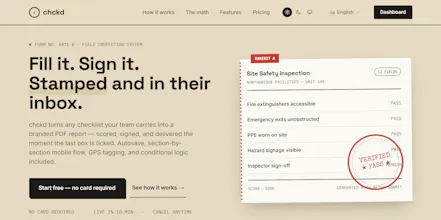
chckd eliminates the gap. The checklist is the report. Fill it out, tap submit, and the PDF is already on its way.
Report
One thing that would make this way more useful for my team is conditional logic between checklist items, like skipping whole sections based on an earlier answer. Right now everything is linear, so technicians still have to manually skip questions that don't apply, which kind of defeats the purpose.
Report
Maker
@tlinzheb Thank you for the feedback. chckd already supports conditional logic between checklist items. In the template builder, every field can have visibility rules attached. You can set conditions like "Show this field only when [field X] equals [value]" or "is empty," "contains," "greater than," etc. Multiple conditions per field are supported.
So if a technician answers "Pass" on an inspection item, you can hide the entire remediation section that follows. A 40-field form becomes a 12-field quick check when everything is fine, and the form adapts in real time as they fill it out.
It is built into the template builder under each field's "Conditional visibility" section. If you have not tried it yet, give it a go. It should handle exactly the use case you described.
Report
A small suggestion from someone who'd actually use this at job sites: add offline mode that syncs the completed checklists, photos, and signatures once a connection comes back. Half the time I'm in basements or buildings with terrible signal, and losing the ability to finish a report just because of spotty wifi would be a dealbreaker for my crew.
Report
Maker
@baharhoruztgwc Brilliant! Thank you for the insight and idea. We are definitely working on that feature.
Report
The automatic PDF generation with branded headers is such a thoughtful touch, saves me from manually formatting reports every week. Really clean execution on the whole flow from checklist to finished doc.
Love how cleanly the PDF reports come out without extra fiddling, that auto-branding touch really shows the team thought through the end-to-end workflow.
One thing that would make this way more useful for my team is conditional logic between checklist items, like skipping whole sections based on an earlier answer. Right now everything is linear, so technicians still have to manually skip questions that don't apply, which kind of defeats the purpose.
@tlinzheb Thank you for the feedback. chckd already supports conditional logic between checklist items. In the template builder, every field can have visibility rules attached. You can set conditions like "Show this field only when [field X] equals [value]" or "is empty," "contains," "greater than," etc. Multiple conditions per field are supported.
So if a technician answers "Pass" on an inspection item, you can hide the entire remediation section that follows. A 40-field form becomes a 12-field quick check when everything is fine, and the form adapts in real time as they fill it out.
It is built into the template builder under each field's "Conditional visibility" section. If you have not tried it yet, give it a go. It should handle exactly the use case you described.
A small suggestion from someone who'd actually use this at job sites: add offline mode that syncs the completed checklists, photos, and signatures once a connection comes back. Half the time I'm in basements or buildings with terrible signal, and losing the ability to finish a report just because of spotty wifi would be a dealbreaker for my crew.
@baharhoruztgwc Brilliant! Thank you for the insight and idea. We are definitely working on that feature.
The automatic PDF generation with branded headers is such a thoughtful touch, saves me from manually formatting reports every week. Really clean execution on the whole flow from checklist to finished doc.
@barantblkrwlh Thank you for the feedback.
Love how cleanly the PDF reports come out without extra fiddling, that auto-branding touch really shows the team thought through the end-to-end workflow.
@ayferkeskide6x Thank you for the feedback.