Akralys: Customize ChatGPT with custom themes, advanced UI tweaks and powerful tools. Export to PDF, edit fonts and colors live.
🔷 Akralys — powerful ChatGPT customization extension. Transform ChatGPT with animated & static themes, advanced dark mode, full UI editor (fonts, colors, layout), branding (custom name + logo) and high-quality PDF export of conversations. Works with GPT-4, GPT-4o and is GPT-5 ready. Ideal for developers, creatives, writers — fast, local-only settings with Manifest v3 compatibility.
Features:
🎨 ChatGPT Themes: animated + static presets
🌑 ChatGPT Dark Mode & UI customization (fonts, colors, width)
🧰 Live Style Editor — build custom themes in real time
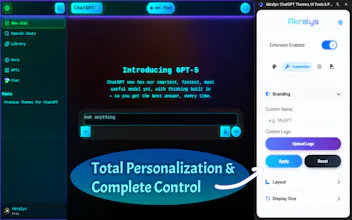
🆔 Branding: custom name & logo for ChatGPT
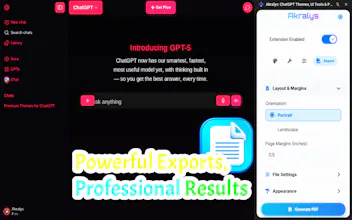
📄 Export ChatGPT conversations to PDF (orientation, margins, quality)
🔒 Lightweight, local-only settings (Manifest v3)
⚛️ Redefine your digital workspace with Akralys, the definitive toolkit for a truly bespoke ChatGPT experience. This extension is engineered to give you granular control over the entire user interface — from core aesthetics to nuanced functionality. Shape everything from fonts and colors to layouts and interactive effects, creating a chat environment that is uniquely yours.
🌌 The Akralys Universe of Enhancements
🔶 Effortless Onboarding & Live Previews:
From the moment you install Akralys, our beautiful and interactive guide helps you with a simple setup. Preview any ChatGPT theme in real-time before applying it. Our intuitive control panel lets you switch styles instantly, giving you a complete picture of your customized ChatGPT experience with just one click.
🔶 Powerful Live Style Editor:
Go beyond presets! Our live editor gives you total control to modify ChatGPT's core colors. Change text, backgrounds, links, and borders to build your very own color scheme from scratch. This is the ultimate tool for true ChatGPT personalization.
🔶 Smart Settings & Optimized Performance:
Akralys intelligently saves all your customization settings locally, ensuring your perfect ChatGPT style is always ready. Built with Manifest v3 for maximum security and future-proof compatibility, our extension is lightweight and performance-optimized. Enjoy a stunning visual transformation without slowing down your browser. Works seamlessly on Windows, Mac, and Linux.
🔶 Advanced PDF Export:
Easily save and share your chats as high-quality, customizable PDF files with full control over the final document.
🎨 Deeper Customization Options
⭐ A Curated Collection of Unique Themes: Instantly transform the look and feel of ChatGPT with a single click. Our library includes both static and fully animated themes designed to inspire. From the neon lights of a cyberpunk future to mystical elegance, find the style that fits you perfectly.
⭐ Advanced Background Customization: Don't limit yourself to presets. Set any background you desire:
- Solid Color: Choose any shade from the color picker.
- Image from URL: Paste a link to any image on the internet.
- Upload Your Own File: Use your personal images or wallpapers to create a truly unique atmosphere.
⭐ Personal Branding: Make ChatGPT truly yours. The branding feature allows you to:
- Set a Custom Name: Replace "ChatGPT" with any title you choose.
- Upload a Custom Logo: Add your company icon or any personal symbol.
⭐ Flexible Layout & UI Tweaks: Go beyond colors and manage the structure of your workspace. Adjust the chat window width and fine-tune the font size for maximum comfort and readability.
⭐ 📄 Save & Share as PDF: Easily save, share, or archive your conversations by exporting them as high-quality, multi-page PDF files. Take full control over the final document with detailed settings:
1. Page Orientation & Margins: Choose between portrait or landscape and set precise margins.
2. Export Quality: Select from Draft, Good, or Best quality presets to balance speed and fidelity.
3. Custom Appearance: Export in a sleek dark mode or customize the background color to match your branding.
4. Dynamic Filename: Set a custom name for your exported files.
✨ Explore Our Growing Theme Universe
We've organized our theme library into distinct universes to help you find the perfect aesthetic for your workflow.
🌌 Cybernetic & Digital Realms
➤ Cyberpunk City: Dive into a neon-drenched future with animated fog, glitch effects, and vibrant glows.
➤ Dracula Nocturne Pro: An elegant and mystical theme featuring deep, dark tones, animated "cosmic dust," and the classic Dracula color palette.
➤ Digital Static: A minimalist dark theme with a digital noise effect for fans of the classic hacker aesthetic.
➤ Blue Matrix: Immerse yourself in the iconic digital universe with an effect of falling blue code symbols.
➤ Cyberglow: A vibrant and energetic theme with intense neon glows and high-contrast colors.
➤ Quantum Flux: A futuristic design with animated quantum particles and flowing streams of energy.
🔮 Abstract & Energetic Forces
➤ Aetherial Pulse: A light and airy theme with soft pulsations and gentle, calming gradients.
➤ Chroma Shift: A dynamic theme where colors smoothly transition, creating a hypnotic and mesmerizing effect.
➤ Ember Surge: A hot and fiery theme with effects of glowing embers and flickering flames.
🌑 Sleek & Modern Aesthetics
➤ Carbon Silver: A sleek and stylish design combining a carbon fiber texture with a cool, metallic sheen.
➤ Dark Space: Deep space with a field of twinkling stars right on your screen.
...and our universe of themes is constantly expanding!
🛡️ Your Privacy, Our Commitment
We engineered Akralys with a privacy-first philosophy. Your data and conversations are yours alone.
🔒️ Zero Data Transmission: The extension does not collect, read, or transmit any of your chat history or personal information. All operations happen locally in your browser.
🔒️ Secure Local Storage: Your settings, including custom themes and preferences, are saved securely on your computer using your browser's native storage. Nothing is ever sent to an external server.
🔒️ Transparent Permissions: Akralys requests only the essential permissions needed to modify the appearance of the ChatGPT website. No more, no less.
🎯 Engineered for Every Workflow
👤 For Coders & Technical Users: Enhance focus during long sessions with a custom dark mode. Improve code readability with the perfect font size and syntax highlighting that suits your style.
👤 For Creatives & Marketers: Brand your workspace to match your project's aesthetic. Use themes that inspire creativity and make your AI interactions feel more engaging.
👤 For Academics & Writers: Optimize your reading and writing environment. Set a calming color scheme and adjust text size to reduce eye strain and improve concentration.
👤 For the Style-Conscious: Elevate a functional tool into a visually stunning experience. Because a beautiful workspace is a more productive workspace.
⚡ Begin Your Transformation in Seconds
⭐ Try all VIP features with our 7-day free trial, no credit card required!
1. Install Akralys: Click the “Add to Chrome” button.
2. Launch ChatGPT: Navigate to the chat.openai.com website.
3. Open the Akralys Panel: Click the extension's icon in your browser toolbar to reveal the control panel.
4. Apply a Theme: Choose any style from the "Themes" tab for an instant makeover.
5. Customize Everything: Explore the other tabs to fine-tune your experience to perfection.
✅ Plans & Pricing
🎁 FREE: Enjoy a curated collection of high-quality static and animated themes.
⭐ VIP MEMBERSHIP: Unlock all premium features, including the powerful Live Style Editor, all exclusive themes, personal branding, advanced layout controls, and PDF export. Choose from flexible monthly, annual, or lifetime plans.
(All VIP features are available in the 7-day free trial.)
Retro Y2K Theme