CardPointers 5

CardPointers 5

The smart way to use credit cards

97 followers

CardPointers 5 for Mac was just released, with some great new macOS Sonoma features: • Interactive Widgets for your Desktop • New App Shortcuts • Auto-Add Amex, Chase, BoA, and Citi Offers • 100s of app improvements
CardPointers 5 gallery image
Free Options
Launch Team
Flowstep
Flowstep
Generate real UI in seconds
Promoted

What do you think? …

Chris Messina
Love how thoroughly CardPointers takes advantage of EVERY new feature on macOS Sonoma AND iOS 17! Love it.
Emmanuel Crouvisier
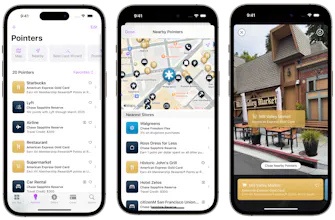
Hi everyone! I'm Emmanuel, the founder/developer of CardPointers, proudly still indie + bootstrapped after nearly 5 years, and I left my job at a startup in 2022 to focus 100% on CardPointers. My goal with everything in CardPointers boils down to one thing: save every user money and earn more points from the credit cards in their wallet. All of the tools I've built do this in a privacy-focused way: * Users enter their cards just by name (no bank logins), and the app will automatically sort all of their cards across thousands of different stores and categories to help them earn more points for every purchase. * Users can auto-add every Amex, Chase, Bank of America, and Citi Offer securely by logging into the bank website as usual, and only after that will the Safari/Chrome extension kick in to add and sync every offer, saving users from having to manually add each one. * As users shop online, the extension will automatically remind you when you have an offer on that site (all handled on-device, no browser history leaves your device), and the app will also remind you about those offers when you check for which card to use to maximize your savings. The huge CardPointers 5 update adds the feature I've been working towards since the start of the app: AutoPilot. Turn on AutoPilot when you leave your home, and as you arrive at every store you'll automatically see which card/offer to use at that store right on your lock screen thanks to Live Activities in iOS 17. It really feels like magic. You can get a 50% discount on the annual or lifetime plans today for the Product Hunt launch through this link: https://cardpointers.com/product... Huge thanks to @chrismessina for hunting CardPointers 5 and being a long-time user, you rock!
Paul Gorval
Hey @chrismessina, I too love how seamlessly CardPointers incorporates the latest iOS and macOS features! It's incredibly user-friendly and intuitive. I've been able to optimize my credit card usage like never before. Kudos to the team!
Hikaru Nagashima
Looks incredibly user-friendly. The widgets are awesome!
Emmanuel Crouvisier
@hikaru_nagashima Thank you, the new interactive widgets save a lot of time and make them so much more useful.
Congrats on your launch
Emmanuel Crouvisier
@dilancelik Thanks!
Rami
I only use Chase.
Emmanuel Crouvisier
@kingromstar Chase has my favorite travel partners, and often has some good offers too -- hope you'll find the extension really useful to auto-add all of your Chase offers across all of your cards, it's a big time + money saver :)
Neha
Looks nice and more user friendly, congratulations on the launch.
Emmanuel Crouvisier
@neha_8 Thanks so much!
123
Next
Last