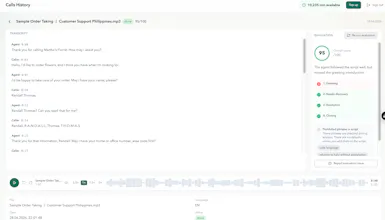
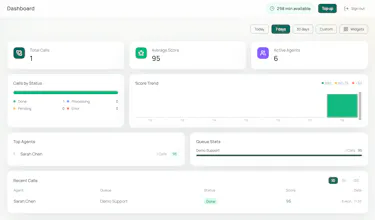
Call Trace scores 100% of calls against your script — not a 2% sample. It checks mandatory phrases, script stages (passed / partial / missed), and shows agent coaching signals on real-time dashboards. Built by an ex–call center lead after 10 years of manual QA. 300 free minutes on your recordings. No credit card.
No reviews yetBe the first to leave a review for Call Trace
Maker
📌
Hey Product Hunt 👋
I spent 5 years inside call centers — starting as an agent in university, then moving up to supervisor, QA manager, and eventually head of a call center.
The same problem followed me at every level: to know how your team really performs, you have to listen to calls. But manually, you can only cover 2–5% of conversations. The rest is a blind spot — missed scripts, broken compliance, unhappy customers you only hear about through complaints.
I filled out checklists by hand, merged scores into spreadsheets, and spent weeks calibrating QA teams for every new project. At some point I stopped asking "who missed this stage?" and started asking "why is a human still doing this?"
That's why I built Call Trace.
It scores every call against your script — mandatory phrases, stage checks, passed/partial/missed — and gives managers dashboards and coaching signals instead of random sampling.
What we're launching today:
→ 100% call coverage, not a QA sample
→ Script-stage scoring per agent
→ Real-time dashboards by team and campaign
→ 30-second summaries instead of replaying full recordings
→ 300 free minutes to test on your own calls — no credit card
I'd love your feedback — especially if you've run a contact center, sales team, or support operation. What would make this genuinely useful for you?
Happy to answer anything in the comments 🙌
Report
How does it handle accents or background noise when checking for mandatory phrases, and does that ever mess with the accuracy of the script scoring?
Report
Maker
Great question, @berivanmuh7 — this is exactly what we test in every pilot.
The flow is: audio → transcription → script scoring against the transcript (mandatory phrases + stage checks).
On accents: we use modern speech-to-text that handles multiple languages and regional accents well in normal contact-center conditions. Your pilot runs on your actual recordings, so you can see how it performs on your agents' voices before committing.
On background noise: heavy noise can affect transcription quality, which in turn affects scoring — we're transparent about that. If the transcript misses a phrase because of audio quality, the score may reflect that. That's why every call includes the full transcript with timestamps, so QA can verify flagged stages instead of trusting a black box.
Scoring isn't just pass/fail either — stages can be marked passed, partial, or missed, and managers can review and dispute an evaluation if the transcript looks wrong.
Happy to run a test on a few of your noisiest recordings during the pilot — that's usually the fastest way to see if it works for your floor.
Report
Does it integrate directly with common dialers like Aircall or Genesys, or do recordings need to be uploaded manually?
1. Manual upload — drag & drop recordings in the dashboard (fastest way to start a pilot)
2. API — POST a recording URL to our API and get results back via webhooks when analysis is done
We don't have a native one-click Aircall or Genesys integration yet. But if your dialer can push a recording URL after each call (many can via their own webhooks or export), you can connect that flow to Call Trace through the API — no manual upload needed.
Native dialer integrations are on our roadmap. Aircall and Genesys are both on the list — happy to prioritize based on what our early customers actually use.
If you tell me which dialer your team runs, I can map out the exact integration path for your setup.
Report
Scored a few of my old recordings and the stage detection was surprisingly accurate, even catching a partial disclosure I had missed manually. The real-time dashboard for coaching cues is genuinely useful.
The partial disclosure catch is exactly the kind of thing manual QA misses when you're sampling 2–5% of calls. That's the gap we built Call Trace to close.
If you run more tests and spot anything the scoring gets wrong — transcript, stage, mandatory phrase — let me know. We're actively tuning based on real recordings like yours.
Appreciate you trying it on launch day 🙌
Report
Dropped an upvote, running a sales outbound team and keeping track of mandatory legal disclosures is stressful this layer fixes that anxiety. Amazing launch @reistline 👏👏
How does it handle accents or background noise when checking for mandatory phrases, and does that ever mess with the accuracy of the script scoring?
Great question, @berivanmuh7 — this is exactly what we test in every pilot.
The flow is: audio → transcription → script scoring against the transcript (mandatory phrases + stage checks).
On accents: we use modern speech-to-text that handles multiple languages and regional accents well in normal contact-center conditions. Your pilot runs on your actual recordings, so you can see how it performs on your agents' voices before committing.
On background noise: heavy noise can affect transcription quality, which in turn affects scoring — we're transparent about that. If the transcript misses a phrase because of audio quality, the score may reflect that. That's why every call includes the full transcript with timestamps, so QA can verify flagged stages instead of trusting a black box.
Scoring isn't just pass/fail either — stages can be marked passed, partial, or missed, and managers can review and dispute an evaluation if the transcript looks wrong.
Happy to run a test on a few of your noisiest recordings during the pilot — that's usually the fastest way to see if it works for your floor.
Does it integrate directly with common dialers like Aircall or Genesys, or do recordings need to be uploaded manually?
Good question, @erdalenbabx0c .
Today you have two options:
1. Manual upload — drag & drop recordings in the dashboard (fastest way to start a pilot)
2. API — POST a recording URL to our API and get results back via webhooks when analysis is done
We don't have a native one-click Aircall or Genesys integration yet. But if your dialer can push a recording URL after each call (many can via their own webhooks or export), you can connect that flow to Call Trace through the API — no manual upload needed.
Native dialer integrations are on our roadmap. Aircall and Genesys are both on the list — happy to prioritize based on what our early customers actually use.
Docs: call-trace.com/en/developers
If you tell me which dialer your team runs, I can map out the exact integration path for your setup.
Scored a few of my old recordings and the stage detection was surprisingly accurate, even catching a partial disclosure I had missed manually. The real-time dashboard for coaching cues is genuinely useful.
Thanks @eylulm47724 — really glad to hear that!
The partial disclosure catch is exactly the kind of thing manual QA misses when you're sampling 2–5% of calls. That's the gap we built Call Trace to close.
If you run more tests and spot anything the scoring gets wrong — transcript, stage, mandatory phrase — let me know. We're actively tuning based on real recordings like yours.
Appreciate you trying it on launch day 🙌
Dropped an upvote, running a sales outbound team and keeping track of mandatory legal disclosures is stressful this layer fixes that anxiety. Amazing launch @reistline 👏👏