Launched this week

Bytesweep
A graphical GUI that knows what not to delete
4 followers
A graphical GUI that knows what not to delete
4 followers
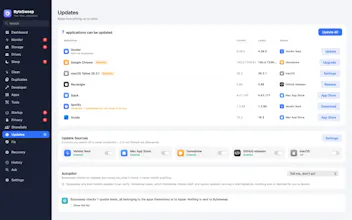
Bytesweep finds what filled your Mac — Docker, Xcode, Ollama and LM Studio models — and names what you are about to delete before it goes: SSH keys, unpushed git history, VM disks, photo libraries, open databases. Every sweep is undoable for 7 days. macOS and Linux, $15 once, no subscription.

Hey Product Hunt! 👋
I'm Faheen, and I built Bytesweep because my MacBook kept saying "Your disk is almost full", and the grey "System Data" bar in Settings was 120 GB of I-have-no-idea.
The tools I tried fell into two camps. Disk analyzers drew me a nice picture and then left me alone with the scary "is this safe to delete?" question. Cleaners deleted things I couldn't see and asked me to trust them. I wanted one app that does both, and that would give my files back if it got something wrong.
So here's what Bytesweep does 👇
🔍 SEE WHERE THE SPACE WENT
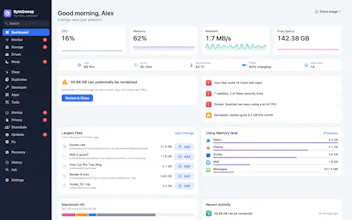
• Scans your internal disk, external drives or network shares locally. ~10 seconds for 2M files on Apple silicon.
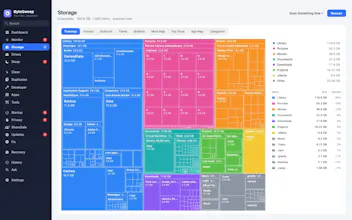
• 8 views, because different questions need different pictures: Treemap, Sunburst, Flame, Bubbles, Mind Map, Folders, Top Sizes and Age Map (where forgotten files hide).
• Inspector for any file: real on-disk vs logical size, APFS compression savings, Quick Look, reveal in Finder.
• Remembers your last scan, so it opens instantly. Refreshing reuses everything that hasn't changed (about 5× faster).
• Drop any folder on the window to scan it.
🛡️ SORTED BY WHAT YOU'D LOSE, NOT "JUNK VS NOT JUNK"
• Refused: the OS, your home folder, volume roots. There's no button.
• Irreplaceable: SSH/GPG keys, certificates, cloud credentials, crypto wallets, unpushed git history, VM disks, photo libraries, open databases. Each one is named, and the delete button stays disabled until you confirm.
• Yours: Documents, Desktop, your own source code, anything touched today. Called out by name.
• Rebuilt automatically: caches and dependency folders, marked in green so you stop hesitating.
A private key inside node_modules is still flagged as a private key.
↩️ SAFE SWEEP + A REAL UNDO
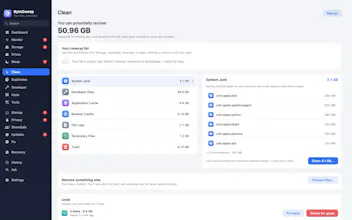
• Safe Sweep = one number, one button, only provably safe stuff (caches, logs, build output, trash, old installers, stale dependency folders).
• Nothing is deleted outright. Every sweep becomes a restore point on the same disk (an instant rename, not a copy).
• Undo in one click for 7 days (adjustable), then the space is really freed.
🍎 "SYSTEM DATA", TAKEN APART
• Time Machine local snapshots, Xcode DerivedData, iOS simulators, iPhone backups, Docker.raw, Mail attachments, app caches, Homebrew/npm/pip caches.
• Leftovers from apps you deleted years ago (never pre-selected, only folders untouched for 90+ days).
• iCloud/Dropbox/OneDrive/Google Drive: what's really on disk vs online-only, and send files back to the cloud instead of deleting them.
• Maintenance tasks show the exact command before you approve them, and admin rights go through macOS's own prompt.
👩💻 BUILT WITH DEVELOPERS IN MIND
• Projects view: every git repo with its node_modules / target / .venv / build folders, the last real source edit, and reinstall hints. Clean all your stale projects at once.
• Finds local AI models (Ollama, LM Studio, Hugging Face, PyTorch, GPT4All, Whisper) plus Cursor, Claude, Copilot, Codeium, Continue and Zed caches. Model weights are flagged for review, never marked as disposable.
• Android SDK/AVDs, CocoaPods, cargo, go, Maven, uv, and Playwright/Puppeteer browsers.
🧰 EVERYTHING ELSE
• Full uninstaller: app, support files, caches, launch agents. Also undoable.
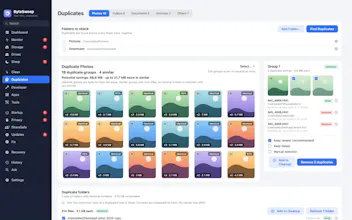
• Byte-for-byte duplicates + similar photos (bursts, re-saves, resized exports, HEIC/JPEG pairs).
• "+12 GB since Tuesday, mostly ~/Library/Caches", plus a forecast of when your disk will fill up.
• Scheduled weekly reports, PDF/HTML export.
• Menu-bar free space, low-disk and large-file alerts, and a live monitor for CPU, RAM, network and SMART disk health.
• All your machines in one table via any synced folder.
• 14 languages, dark mode, full keyboard + screen-reader support.
🔒 PRIVATE BY DESIGN
No account, no telemetry, no analytics. File names never leave your Mac. The only network call is the licence check. Turn off Wi-Fi and everything else still works. Signed and notarized by Apple.
🙅 WHAT IT WON'T DO (being upfront)
• It won't "speed up your Mac". Disk space isn't performance.
• It won't clean on its own. Every removal is one you ticked.
• It's not antivirus, and it will never tell you you're infected to sell an upgrade.
💸 PRICING
14-day free trial, no card, no account. Then $15 once, for 3 computers (any mix of macOS and Linux). No subscription, all 1.x updates free, 14-day money-back guarantee. About 50% cheaper automatically outside high-income countries. Windows is in progress, and your licence will cover it.
I'd love your honest feedback, especially if you find a folder Bytesweep gets wrong. That's how the next version gets better. I'll be here all day answering questions 🙌