
Bluedot
Invisible, privacy-first AI note taker
4.7•12 reviews•2.3K followers
Invisible, privacy-first AI note taker
4.7•12 reviews•2.3K followers
Bluedot captures, transcribes, and summarises every meeting, online or in-person. Works on any platform and auto-updates your CRM, Notion and more.
This is the 4th launch from Bluedot. View more

Bluedot 2.1
Launched this week
Bluedot 2.1 brings your real-world conversations into Claude.
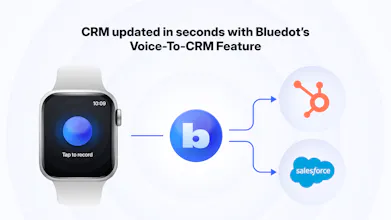
Record conversations directly from your Apple Watch, then sync them with Claude through MCP. Capture customer calls, hallway chats, interviews, coffee meetings, and in-person conversations, without a laptop or meeting bot.
Bluedot turns every conversation into searchable, AI-ready context that Claude can summarize, search, and act on.


Free Options
Launch Team


COZY
What about the battery usage? If I have a meeting that last for an hour or so how much this will drain?
Bluedot
@michele_di_brigida_bajara we optimise well for the battery usage, so you should't worry. Your exact drain would depend on the mode of the phone.
We tested three meeting AI tools for client calls at our IT services company. Transcription quality was never the differentiator — they all get it right. What killed the ROI was the handoff. Summaries hit an inbox, nobody acted on them. The CRM sync is what actually changes behavior because it removes the manual step that sales people always skip. The Apple Watch angle is smart — hallway conversations are where the real decisions happen, not the scheduled calls.
i think transparency matters a lot here 🔥 Even a lightweight sidebar showing “what the assistant remembers” would build more trust
Bluedot
@rocky_bhai39 we do exactly this way!
My old method - step away from the trade show booth, record my notes from the chat by voice recorder, enter into CRM later at the hotel. Major value add here Bluedot team!
Bluedot
@james_dunnigan Exactly! No one wants to update CRM after a long day.
The coffee machine and back-of-an-Uber examples are exactly the noisy, overlapping-voices settings where transcription tends to fall apart. How does it hold up with two people talking over each other and engine/clatter in the background — and does it separate who said what, or come back as one undifferentiated block?
Congrats on the launch! The Apple Watch capture feels like the right form factor for the off-desk conversations that usually get lost. Curious how you’re handling consent and visibility for in-person recording, especially in more casual settings like dinners or hallway chats?
Can this work as my personal note? I've been looking for the ability to record things on my watch, then transcribe it, then to claude or notion. that would be amazing!