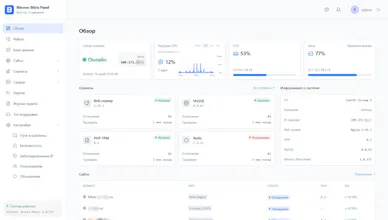
Bitrix servers are often managed via an SSH menu. Hosting panels tend to rewrite nginx and take over port 443 — risky on production. Bitrovo is a free web panel for Bitrix / Bitrix24 servers: sites, PHP, databases, services, disk, crontab, and support. It installs next to live sites, not on top of them. Signed releases, dry-run install, rollback on failure. If 443 is busy, it uses its own HTTPS port.
Hey Product Hunt 👋
What inspired me: years of running production 1C-Bitrix / Bitrix24 servers. The “official” way is still SSH as root, run /root/menu.sh, and click through a numbered BitrixVM menu for PHP, sites, services, and cron. It works — but it’s slow, easy to mis-click, and awful if you’re not living in a terminal.
What problem I was solving: Bitrix servers already have a stack (nginx, PHP-FPM, MariaDB, Redis, sites on 443). What’s missing is a safe web UI for day-to-day ops. Generic hosting panels want to own the machine: rewrite vhosts, grab port 443, assume a clean server. That’s unacceptable on a live shop.
How the approach evolved: I first tried wrapping the BitrixVM menu in a browser. That idea died fast — you inherit its surprises and it still feels like a terminal. So Bitrovo became its own control plane, installed beside Bitrix, not on top of it.
The real design work became a list of non-goals: don’t run apt upgrade, don’t rewrite existing nginx configs, don’t become default_server on 443, and if health-check fails — roll everything back. Releases are signed, install can dry-run first, the API listens on localhost only, and the first admin is created with a one-time bootstrap token from the server.
Today Bitrovo: Bitrix Panel lets you manage sites, PHP, databases, services, disk, crontab, background jobs, and support tickets from the browser — without migrating the server and without production surprises.
Would love your feedback, especially from anyone who’s lived inside BitrixVM.