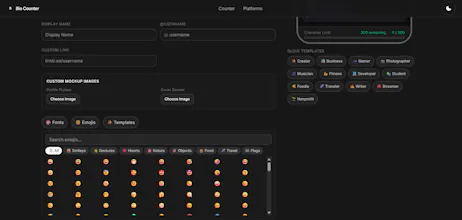
I was watching a YouTube video where the speaker said: "Find a tiny everyday tool, look at what makes it frustrating, and build a better version." That led me to bio counters. Most are stuck in 2012—ad-bloated, slow, and blind to how text looks on a phone. So I built a minimalist sandbox using Astro 5 & Tailwind v4. It gives you a clean 2-column layout with a live phone preview for 9 platforms. It even tracks multi-byte emojis perfectly via Unicode grapheme iteration so limits don't break!
No reviews yetBe the first to leave a review for Bio Counter
Maker
📌
Hey everyone!
I'm Shashank. I was watching a YouTube video a bit ago where the speaker said if you want to build something good, just find a tiny everyday tool that's annoying and fix it.
That made me find character counters. Every time I try to format a social bio, the sites are stuck in 2012—covered in heavy ads, slow, and you can't even see how the text will actually look on a phone screen.
So I built Bio Counter using Astro 5 and Tailwind v4. It's a clean, Vercel-inspired layout where you type on the left and see an actual smartphone mockup preview for 9 different social platforms on the right.
I also made sure it handles multi-byte emojis properly under the hood (using Unicode grapheme iteration) so the character counts don't suddenly break when you paste it live on your profile. It's completely free, fast, and has zero annoying bloat. I'd love to hear what you think or what platforms I should add next!
Report
How does the live preview stay in sync when I switch between platforms mid-edit, and is there any way to compare two platforms side by side?
Report
Maker
@sebahat2cva Hi Sebahat! Thanks for checking out Bio Counter!
Under the hood, Bio Counter uses a single shared text input that acts as the single source of truth. Whenever you type or edit, the app updates the preview elements for all platforms simultaneously in the DOM. When you switch platforms, the active mockup is simply toggled visible, showing your latest edits instantly without any delay or sync lag!
Regarding side-by-side comparison: currently, the tool only renders one active mock container at a time. However, this is a fantastic suggestion! As a quick workaround, you can open two browser windows side-by-side, but we’ve officially added a dedicated 'Split/Compare View' layout to our feature roadmap. Thanks for the feedback!
How does the live preview stay in sync when I switch between platforms mid-edit, and is there any way to compare two platforms side by side?
@sebahat2cva Hi Sebahat! Thanks for checking out Bio Counter!
Under the hood, Bio Counter uses a single shared text input that acts as the single source of truth. Whenever you type or edit, the app updates the preview elements for all platforms simultaneously in the DOM. When you switch platforms, the active mockup is simply toggled visible, showing your latest edits instantly without any delay or sync lag!
Regarding side-by-side comparison: currently, the tool only renders one active mock container at a time. However, this is a fantastic suggestion! As a quick workaround, you can open two browser windows side-by-side, but we’ve officially added a dedicated 'Split/Compare View' layout to our feature roadmap. Thanks for the feedback!