Benchpad: Scratchpad Notes
Three scratchpads. Sections-based. No complexity, no AI.
20 followers
Three scratchpads. Sections-based. No complexity, no AI.
20 followers
Benchpad is a scratchpad, not a second brain.
Three pads. You name them — Work / Personal / Scratch, Today / This Week /
Someday, whatever fits your head. No folders, no tags, no filing decisions.
Open, type, close.
Three scratchpads that work everywhere — iPhone, Android, Mac/Windows, web, even as a browser extension. Offline-first, no folders, no AI. Stop organising, start writing
This is the 2nd launch from Benchpad: Scratchpad Notes. View more

Benchpad: Scratchpad Notes
Launched this week
Three scratchpads. Sections-based. Offline-first, no folders, no AI. Open, type, close. Free forever — no credit card. A note app that knows when to stop.


Free Options
Launch Team

What's new:
Sections based scratchpads
New templates and themes
UX refresh from the ground up
Mac tray app and Chrome extension
WRITE WITHOUT DECIDING
Every note app asks "where does this go?" before you've written a word.
Benchpad doesn't. Three pads means the decision is already made.
WORKS ON A PLANE
Offline-first, not offline-tolerant. Every keystroke saves to your device
before any network request. Sync happens in the background when you're online
— and merges conflict-free if you edited on two devices at once.
CONSTRAINT IS THE PRODUCT
Benchpad is for people who want to write things down — not maintain a system.
A note app that knows when to stop.
When you can't create infinite folders, you write instead of organizing. Constraint isn't a compromise. It's the product.
WORKS LIKE A COMPUTER
Scratchpads are your RAM.
Archive is the ROM.
Scratchpads: Active thinking. Fast, temporary, always in use.
Archive: Permanent, searchable, never in the way.
This is how your brain actually works. Benchpad works the same way.
A REAL EDITOR
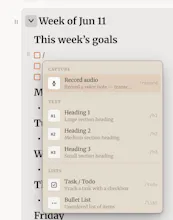
Headings, checklists, tables, code blocks with syntax highlighting, images,
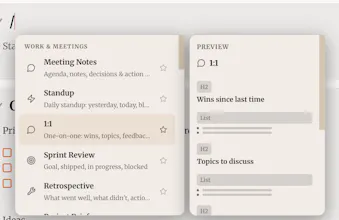
file attachments. Slash commands and ~28 templates (meeting notes, standup,
daily note, habit tracker). Voice notes with live on-device transcription —
your device's dictation, not AI.
DONE ISN'T DELETED
When a section is finished, archive it — tagged, dated, searchable,
restorable. Pads stay clean. Nothing disappears.
NO AI. NO ADS. NO DATA MINING.
Nothing reads, summarizes, or trains on your notes. Notes are encrypted at
rest. Plain markdown — copy everything out anytime, no lock-in.
FREE FOREVER, REALLY
One pad, the full editor, offline support, sync, and an archive of 100 notes —
free, no credit card, no time limit. Pro ($20/year flat) unlocks all three
pads, all six themes, attachments, voice-note audio, and Markdown/PDF export.
Benchpad is for people who want to write things down — not maintain a system.
A note app that knows when to stop.
Love the no-friction approach, the offline sync across devices is genuinely useful for me. One thing I'd love to see is a simple universal search across all three pads at once with optional per-pad filtering, since right now scrolling back through older entries is the main friction point for me.
@ensarqp2a Hi, thanks for using the app!
There is a global search available. On web you can just press Cmd+K or click the little search icon on the bottom right.
On the mac tray app there is a configurable OS level shortcut to quickly search through your scratchpads, default set to Cmd+Shift+F
The three pad setup is exactly what I need, no friction. One thing I'd love is a quick keyboard shortcut or swipe to instantly clear all text in a pad after I'm done with a thought, instead of having to select all and delete manually every time.
@asiyeenisoczbn Hi! Thanks for using the app!
This is a nice idea, I'll add it to the backlog. You can currently just archive the section instead of deleting it. That way it'll get out of your way but still ne accessible in the archive if needed later.
love that it skips the whole folder rabbit hole, that's exactly what i need from a scratchpad. one thing i'd kill for though is a quick keyboard shortcut to jump straight to a specific pad, like cmd+1, cmd+2, cmd+3 to flip between work and personal without needing to click around. would make it feel even snappier on mac
@selma1732277 Hi, thanks for using the app!
There already exists that very shortcut!
But its Option(⌥)+1/2/3 instead of Cmd+1/2/3 because the latter conflicts with browser shortcut of switching between tabs.
You can see all the shortcuts available in settings.
Love the no-folder, just-write vibe. One thing I'd love is a simple dated history view for each pad so I can scroll back through previous entries when I need to find that note from last Tuesday without it being a hunt.
@cetin11914 Hi! Thanks for using my app!
I don't completely understood your problem. The sections already have a date field at the end plus the scratchpad nature of this app is to value search over it being a hunt.
Can you tell me more what you're referring to? a sortable or chronological view of all the sections?
Finally something that doesn't try to be everything. The three-pad setup is honestly kind of perfect for someone like me who just needs to dump thoughts without deciding where they go.
@halit1279079 Hey, thanks so much for trying out the app!
I was also fed up of bloated apps when all I wanted was to quickly jot something down.
Have you tried the mac/deksop quick capture app? It gets out of your way even more!