Launching today

Barista
Email, calendar and clipboard right in your Mac menu bar
1 follower
Email, calendar and clipboard right in your Mac menu bar
1 follower
Read and answer email, check your calendar, add a reminder, grab something from your clipboard history: all from the Menu Bar, without switching apps. 30+ productivity and utility widgets in one native Mac app, with a floating bar when the notch hides everything.



Hi Product Hunt 👋 I'm Konstantinos, the developer of Barista.
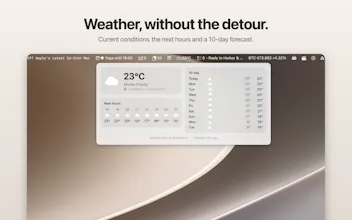
Barista puts the things you reach for a hundred times a day right in the menu bar, so you never leave what you're working on. Glance at your inbox, read and answer an email, check what's next on your calendar, add a reminder, grab something from your clipboard history, check the weather: all from a popover, without switching apps or moving a window.
The ones people use most:
Email: a real client (Gmail, iCloud, any IMAP/SMTP account) with threads, compose, reply and attachments, right in the popover.
Calendar and Reminders: your day and month at a glance, create and edit events, join your next meeting in one click.
Clipboard: searchable history of text, images, files and links, with pinned items.
And everything in between: weather, stocks and crypto, an RSS news ticker, system stats, translate, unit converter, color picker, scratchpad and 25+ more.
When the menu bar is full or hidden behind the notch, Barista's own floating bar (⌥⌘B) keeps all of it one hotkey away.
It's free to try for 14 days. I'm here all day: tell me which widget you'd reach for first, and what's missing.