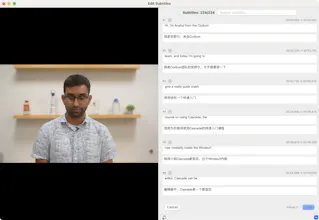
AutoSRT: Free AI-powered dual language subtitle generator for Mac. Create bilingual subtitles instantly, 100% offline. Perfect for language learning, content creators, and international videos. #AutoSRT #AISubtitles #DualLanguage #MacApp
π Hey Product Hunt! π
Iβm thrilled to introduce AutoSRT, a powerful AI-driven tool that automatically generates subtitles for your videos in minutes. Whether youβre a content creator, educator, or business professional, subtitles are critical for improving accessibility and engagement β and AutoSRT makes the process effortless.
Why AutoSRT?
π‘ Save Time β No more hours of manual transcription.
π Multilingual Support β Generate subtitles in multiple languages.
πΉ Easy to Use β Upload your video, and let AutoSRT handle the rest!
We built AutoSRT because we saw how tedious subtitle creation can be for creators and businesses. Our goal is to make professional-quality subtitling accessible to everyone.
π¬ Iβd love to hear your thoughts and feedback! Weβre offering free trials for all Product Hunt users β give it a try and let me know what you think!
π Check it out here: [https://yyaadet.github.io/autosr...]
Thank you for your support, and Iβm here to answer any questions! π
Report
I downloaded your product today. It's very good but I can't find a feature that lets me manually align the generated subtitles with the timing of the video. I have a video where the subtitle is appearing about 20-30 second before it should and it's not good quality. Does the team plan to add a manual alignment feature for the subtitles? Is there an existing solution to this that I may have missed?
Also, I'm getting an error were if my Source Language is Spanish and Target Language is Simplified Chinese, then the subtitles will start in Spanish and Chinese but end up switching to English and Chinese somewhere in the middle. Is there a fix for this?
Report
No reviews yetBe the first to leave a review for AutoSRT
I downloaded your product today. It's very good but I can't find a feature that lets me manually align the generated subtitles with the timing of the video. I have a video where the subtitle is appearing about 20-30 second before it should and it's not good quality. Does the team plan to add a manual alignment feature for the subtitles? Is there an existing solution to this that I may have missed?
Also, I'm getting an error were if my Source Language is Spanish and Target Language is Simplified Chinese, then the subtitles will start in Spanish and Chinese but end up switching to English and Chinese somewhere in the middle. Is there a fix for this?