Launching today

Atelier
The studio your AI coding agents work in
11 followers
The studio your AI coding agents work in
11 followers
Atelier makes your Claude plan last: Codex finds the problems and Claude only judges them (about 71% fewer Claude tokens per review), long chats hand over to fresh sessions, and every session starts from a short brief. Every app you make keeps its tasks, releases, feedback and memory here, and you approve finished work. Native Mac app, 7 days free.





Hi Product Hunt!
I make Mac apps with Claude Code, about twenty of them now. Two things kept hurting. My Claude plan ran out before the week did. And every new session started from nothing: what was half done, what I had sent back, the rule I gave three days ago, the trap the last session fell into. So I built Atelier, the studio my AI coders work in, and it fixed both.
💰 It makes your Claude plan last (the part I care about most)
Savings page: shows, from Claude Code's own logs on your Mac, how much of your Claude plan Atelier saved this week, what the same work would have cost with Claude Code alone, and a week-by-week chart.
Cheaper reviews: Codex finds the problems on your own ChatGPT plan, Claude only judges them. Measured on a real review: 5.14M Claude tokens alone vs 1.48M with Atelier, about 71% less.
Fresh sessions: once a conversation grows long, every reply re-sends that whole history. Atelier notices, has the coder write its page and a handover, and the next session starts fresh from a short brief instead.
A short brief, not the whole project: each session starts from a brief of a few thousand tokens instead of reading the whole project again.
🧠 Your coders remember
A brief at the start of every session: work in progress, what you sent back, what the last session left, the project's memory and your rules.
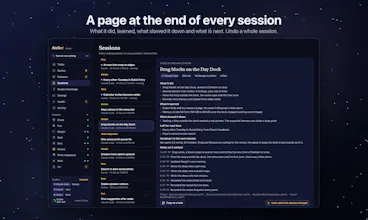
A page at the end of every session: what it did, what it learned, what slowed it down, what is next.
Memory per app: how it is built, the exact commands, the traps, settled and rejected decisions, and recipes that were really run. Claude Code's own memory notes can be brought in and kept checked against the code.
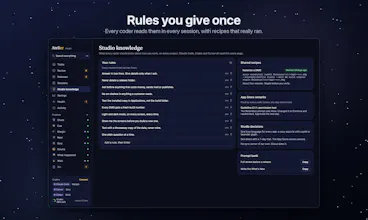
Studio knowledge: rules you give once apply to every project and every coder.
✅ You stay in charge
Review: finished work waits for you with what changed and how to test it. Approve it, or send it back with a note the next session reads first.
Second opinion: Codex reviews risky changes (saving, sync, payments, security) read-only, and your coder gives every finding a verdict.
Activity: every change says who made it and in which session, and a whole session's changes can be undone from its page.
Bin: anything deleted stays for 30 days.
🗂 Every app in one place
Today: what waits for your review and what needs you, across every app.
Per app: brainstorm, roadmap with tasks in every state, releases you plan and ship, customer feedback, details with mockups, notes and running monthly costs.
Releases: which apps have changes you installed but never cut into a DMG, with the DMG folder one click away.
Quality: a Basics checklist before every release, reviews and audits, and health watches (with What Happened, a fix is measured before and after).
Studio extras: a prompt bank, App Store review remarks, shared recipes.
🔌 Works with your coders
An MCP server ships inside the app, so Claude Code, Codex, Cursor and any MCP tool can create, change and finish anything in it. One button in Settings connects Claude Code, the Claude app and Codex.
Optional iCloud sync between your Macs. The menu bar shows what waits for your review and which coder is working on what. Your data stays on your Mac and your own iCloud: no account, no analytics.
7 days free with everything included, no account, no card. Launch price $13.99 with code ATELIERLAUNCH until 16 November (then $19.99), one payment, 3 Macs, free updates. Native Swift, notarized, macOS 14 or later.
I'd love to hear how you keep your AI coders on track, and how long your Claude plan lasts you.
Can I use Atelier to manage multiple apps at the same time?
@freya24 Yes you can add as many apps as you want, you can add them by yourself, or just ask your coder to add them after the MCP is installed.