
AstroShader
Astrophotography for iPhone
6 followers
Astrophotography for iPhone
6 followers
Astrophotography for iPhone. The easy way to capture images of galaxies, nebulae, stars and the Milky Way. Capture controls, intervalometer, automatic alignment+stacking, stacking from your Photos library, editing tools, export format controls and more - all from your iPhone. AstroShader is $1.99 for lifetime access.
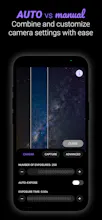

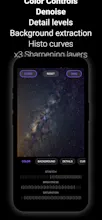
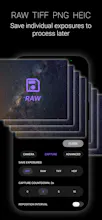


After 3 years in beta and over 100k beta users AstroShader is finally launching...
🔭 📱🚀
---
Who is this for?
Anyone interested in astronomy or photography, or astrophotography. Or if you own a telescope. Or if you're DIY-ing an afocal lens setup for your iPhone
---
...Why?
Shooting photos of stars, galaxies and nebulae (AKA astrophotography) involves capturing and combining dozens or even hundreds of photos to improve the signal of faint night sky objects, or remove noise and blur.
All this capturing and "stacking" is traditionally done with dedicated astrophotography cameras, control systems and processing software. It is complicated, time-consuming and expensive.
AstroShader is designed as a mobile-first approach to astrophotography that makes is quick to get started and see results.
---
How does it work?
🚀 Basic setup:
You need a telescope or tripod (or rock to lean your phone on)
Choose you camera settings
Set the number of images
Run the capture
The images are automatically capture, aligned and stacked
Edit the result using the tools designed for astronomical images
Save in your chosen format
💾 Save now > Process later:
Things often go wrong in astrophotography; clouds, planes, wind, misaligned images... So with AstroShader you can save each exposure as you capture to process them later
Choose the save format
Run the capture
Use the stack images from Photos library tool
Edit and export your astro photos
🛠️ Other workflows:
Editing: A number of users have AstroShader purely as an editing (or "post-processing") tool for images taken with a smart telescope
Capture only workflows: Using AstroShader essentially as an intervalometer then stacking images on a laptop
Stacks-of-stacks: Using long exposures or saving only stacks over multiple nights
Telescope live preview: Simply letting the live preview run whilst attached to a telescope to show people the night sky at star parties
🎨 Other (unexpected) use cases:
I've seen people using AstroShader for day-time long exposure photography, creative photography art classes, landscape photography and more
There is apparently even a biochemical research paper where AstroShader was used for Western blot detection
---
Limitations
Planetary imaging is possible but hard and often fails. This requires a different workflow (see below)
Images straight out of the processing pipeline can look a bit "flat". Editing is absolutely key to this
The learning curve can be a bit steep if you are completely new to astrophotography
---
Resources
👤 FB group: https://www.facebook.com/groups/372761845125284/ (N.B. I'm not actually in this group some early users started it)
💬 CloudyNights forum: https://www.cloudynights.com/forums/topic/857117-astroshader-ios-ap-app-intro-beta-testers-wanted/ (#buildinginpublic since 2022 🤙)
🔎 Search "astroshader" on YouTube/TikTok and there are a bunch of videos and guides by beta users and early adopters
---
Roadmap
Planetary imaging: A video capture and "lucky imaging" processing pipeline, plus planetary specific editing tools
Auto-editing: Using image statistics to "guess" initial editing settings, or show the potential of an image
---
Acknowledgement
AstroShader has been in perennial public beta for years and is only now emerging for launch
I would like to thank the tireless efforts of all the beta testers who have publicly and privately supported with hundreds of hours of testing, bug reports and advice