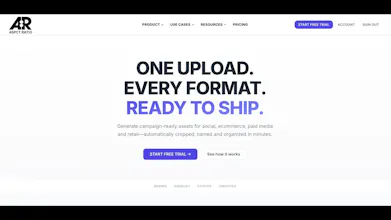
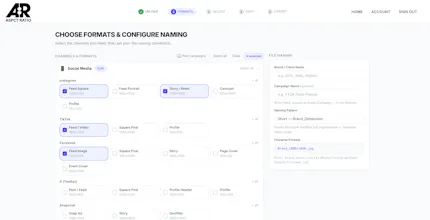
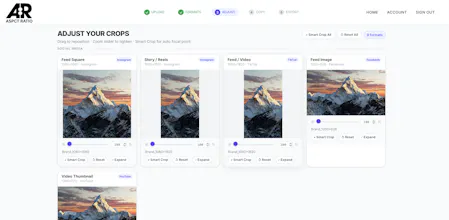
ASPCT RATIO streamlines campaign asset production from start to finish. Upload your master creative, choose from 60+ formats across social, ecommerce, paid media, and retail, fine-tune each crop, add optional copy, then export everything automatically named and organized for every channel.
I’m Kirk, a marketer who got tired of watching the same campaign-production problem happen over and over again.
Once a campaign’s creative is approved, one master asset often has to become dozens—or even hundreds—of deliverables across social, ecommerce, paid media, retail, OOH, and other channels.
That means resizing, re-cropping, renaming, organizing folders, exporting, and making sure every team receives the correct files. It’s necessary work, but it can take hours or days—and very little of it is actually creative.
So I built ASPCT RATIO, the production tool I always wished I had.
The workflow is simple:
Upload your master assets
Select the channels and formats you need
Fine-tune individual crops
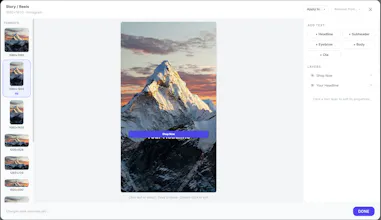
Add simple copy where needed
Export everything automatically named and organized
The goal is not to replace designers or become another all-purpose design platform. It’s to eliminate the repetitive production work that begins once the creative is ready.
ASPCT RATIO currently supports 60+ formats across social, ecommerce, paid media, retail, and OOH, along with custom dimensions, batch processing, custom naming conventions, nested folder structures, and multi-format exports.
I built this around a workflow I’ve personally dealt with throughout my career, but the product is still early—and that’s why I’m launching here.
I’d genuinely love feedback from marketers, designers, creative-operations teams, agencies, and anyone else who has dealt with this process:
What works? What’s confusing? What’s missing? What would make ASPCT RATIO genuinely useful for your workflow or team?
As a thank you to the PH community, use code PRODUCTHUNT50 for 50% off your first 3 months.
Thanks for checking it out. I'm excited to hear what you think.
— Kirk
Report
No reviews yetBe the first to leave a review for ASPCT RATIO







Hey Product Hunt! 👋
I’m Kirk, a marketer who got tired of watching the same campaign-production problem happen over and over again.
Once a campaign’s creative is approved, one master asset often has to become dozens—or even hundreds—of deliverables across social, ecommerce, paid media, retail, OOH, and other channels.
That means resizing, re-cropping, renaming, organizing folders, exporting, and making sure every team receives the correct files. It’s necessary work, but it can take hours or days—and very little of it is actually creative.
So I built ASPCT RATIO, the production tool I always wished I had.
The workflow is simple:
Upload your master assets
Select the channels and formats you need
Fine-tune individual crops
Add simple copy where needed
Export everything automatically named and organized
The goal is not to replace designers or become another all-purpose design platform. It’s to eliminate the repetitive production work that begins once the creative is ready.
ASPCT RATIO currently supports 60+ formats across social, ecommerce, paid media, retail, and OOH, along with custom dimensions, batch processing, custom naming conventions, nested folder structures, and multi-format exports.
I built this around a workflow I’ve personally dealt with throughout my career, but the product is still early—and that’s why I’m launching here.
I’d genuinely love feedback from marketers, designers, creative-operations teams, agencies, and anyone else who has dealt with this process:
What works? What’s confusing? What’s missing? What would make ASPCT RATIO genuinely useful for your workflow or team?
As a thank you to the PH community, use code PRODUCTHUNT50 for 50% off your first 3 months.
Thanks for checking it out. I'm excited to hear what you think.
— Kirk