
Ask Iris
Private visual AI assistant for Apple devices
5 followers
Private visual AI assistant for Apple devices
5 followers
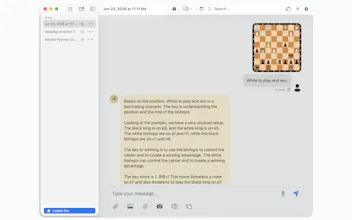
Ask Iris is a private visual AI workspace for Mac, iPhone, and iPad. Attach screenshots, images, PDFs, camera captures, or short clips; ask questions; save useful Visual Clips; and choose models that run locally on your device. Chats, attachments, and inference stay on-device unless you choose a network action like downloading a model.





@tessellate_ai Hi Abhishek,
Congratulations on creating a truly useful application!
I purchased Ask Iris Pro when it was first available for $19.99 USD in the US App Store.
Now that you've changed the price to $0.00 and added an Ask Iris Pro IAP, I don't believe I should have to purchase the IAP since I already paid that amount when I originally bought the app.
I hope you understand and can provide me with a coupon code for the IAP.
Your customer support email address (support@askiris.store) is not working which is why I'm contacting you here. Please advise, thanks!
@ripkim
Hi Richard,
Thanks for your comment. The customer support email should be fixed now.
I appreciate you reaching out separately. I sent an offer code which you can redeem to get a free IAP upgrade.
I'd really appreciate your feedback as you use the app. Feel free to reach out here or on the customer support email about what you'd like to see more of as you continue using the app.
Thanks!
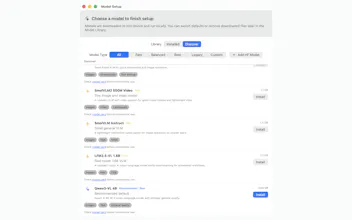
How does the model selection actually work in practice if downloads happen on-device, are you limited to a small curated list or can I pull any GGUF-style model I want and run it through Iris?
@selma174792
Ask Iris has a curated model library (of Hugging Face models) for the common path, plus a custom model option for compatible Hugging Face repos.
Since Ask Iris is built around MLX, it does not currently run arbitrary GGUF / llama.cpp-style models. Custom models need to be MLX-compatible vision-language Hugging Face repositories that the app/runtime can load and validate.