Launching today

ARCFUL
Your tools, one flick away.
2 followers
Your tools, one flick away.
2 followers
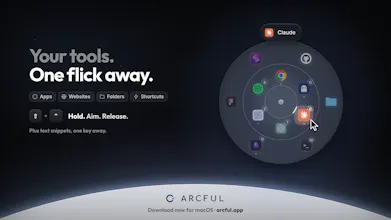
Arcful puts your Mac apps, commands and windows on a ring around your pointer. Hold Shift + Control (or your own keys), aim, let go. Every tool keeps its spot, so your hand learns where it is. Tap Command and the same ring places windows. Press a letter to open a tool or paste a snippet. Start with 2 rings and grow to 4. A slot can change with the app in front, and Tab switches profiles. Try the ring in your browser on arcful.app. One-time purchase, 14-day trial, no account, no telemetry.



Launch Team / Built With


Tines The single, secure environment for agents, apps, and automations.
Promoted
Hey Product Hunt! Yes, another radial menu. But hear me out.
Hold Shift + Control (or your own keys) and a ring of your tools opens around your pointer. Aim at one and let go.
You have seen that part before. Here is what is different:
Your hand learns it. Start with 2 rings and grow to 4, with 6 slots each. Every tool keeps its spot, so after a few days your hand just knows where things are.
Same gesture, second job. Keep holding and tap Command. The ring flips to window placements. Aim, let go, and the front window moves there.
One letter, no aim. While the ring is up, a letter opens a tool or pastes a snippet, like a prompt for your coding agent. No two things share a key.
It changes with your work. In Linear, one slot can open Codex. In Chrome, the same slot can bookmarksthe tab. Tab switches profiles, like Code and Write.
Try it now, with no install: hold Shift + Control on arcful.app. Add Command and the ring moves the page like a window. On a phone, touch and hold.
Why I made it. I'm Steven, an independent developer from Canada. I have built and polished Arcful alone since February. Most of my day is the same 10 or 15 tools. I typed their names in Raycast so fast that I made typos, or I dug through the Dock. I wanted them under my hand, always in the same spot.
Slots hold apps, files, folders, links, Apple Shortcuts and shell commands. My "Fix Writing" command sends the selected text to Claude Code and puts a clean version on the clipboard.
I put a lot of care into polish, and I thought through every detail. A few examples:
Every slot has a unique path. The rings are offset, so no tool sits behind another.
On first launch, ring one fills itself from your Dock, so it works in the first minute.
Drag a file or a link onto the open ring to give it a slot.
Click any icon to edit it right beside the ring.
A short flick toward a tool is enough. You do not have to land on the icon.
$19 USD at launch, then $24. One-time purchase for 3 Macs, with every update in the current major version. The 14-day trial has every feature on, with no card. Only the days you open the ring count. After that, the first ring stays free for your apps.
macOS 14 or later, Apple silicon.
I'd love your feedback! If anything feels off, tell me. I'm reading every comment today.