
Ankylix — Vimium for your Mac windows
Keyboard-driven window manager for macOS
8 followers
Keyboard-driven window manager for macOS
8 followers
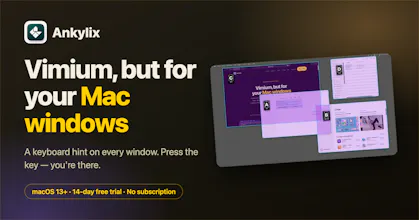
Ankylix brings Vimium-style keyboard hints to macOS window management. A letter appears on every window and zone — press it to jump or tile. Hands never leave the keyboard. 14-day free trial.

Free Options
Launch Team

Customer.ioAutomate Messaging Everywhere — Startups Get 12 Months Free
Promoted
👋 Hey Product Hunt!
I'm Jordi, the solo developer behind Ankylix.
This started as an itch I couldn't scratch. I live on the keyboard — Vim, tmux, and Vimium in the browser — and every time I had to reach for the trackpad just to move or focus a window, it broke my flow.
MacOS window managers either make you memorize a directional shortcut for every position, or you're back to dragging with the mouse.
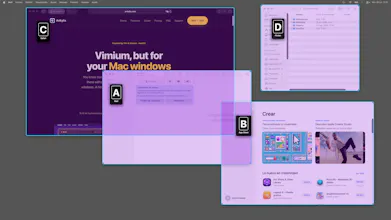
So I stole the one idea from Vimium I love most: link hints. In Vimium, a letter appears on every link and you press it to jump there. Ankylix does that for your windows.
Hit a hotkey → a letter lands on every window and tiling zone → press it, and the window focuses or snaps into place.
Hands never leave the home row.
A few things I care about:
- 🧩 Modal, like Vim — separate modes for switching, tiling, and move/resize (bind it to hjkl). Enter a mode, act, exit. No accidental clicks.
- 🖥️ Multi-monitor aware — hints and layouts work on every display; cycle screens from the keyboard.
- ⌨️ Everything is rebindable — bring your own muscle memory.
- 🪶 Native & private — a real macOS menu-bar app. No Electron, no telemetry, no tracking. Runs entirely locally.
It's a one-time €19 (no subscriptions, ever) with a free 14-day trial — try every feature, no credit card.
I'd genuinely love your feedback, especially on the hint UX and default keybindings — those are the hardest things to get right, and you're exactly the crowd who'll notice. If you live in Vim/tmux/a tiling WM, I think it'll feel like home on day one. Ask me anything! 🙏
How does it handle overlapping windows where the same letter hint might be valid for multiple ones, like a dialog stacked on top of another app?
@uur701440545451 Thank you for your question!. Yes, it handles it nicely by avoiding overlapping. You can test it in the free trial. Just tell me if something does not work for you.
The hints pop up instantly and the chaining feels just smooth enough that I forget I have a trackpad. Wish the hint styling had a darker mode option, but otherwise a really solid take on vimium for window management.
@ceylin1736493 you can create your own themes, dark mode or whatever. You can save themes to switch between them also.
How well does the hint system handle when you have a ton of windows open at once, like 20+ browser tabs across multiple apps? Does it get overwhelming or does it stay manageable?
@yasinv6bc There is no problem with the number of windows for layouts or windows move/resize. Perhaps, if you have many opened windows, you would prefer list mode instead of letter hint mode. App supports both. It is up to you.
The tiny letter overlays sitting right on each window feel really thought out, no clutter, no extra UI noise. Nice work turning a power user idea into something that just blends in.
@eyll59621246276 Thank you!. I am glad to hear your suggestions and thoughts. I want the tool to be really useful to any user.