
Animinder - Your desktop animal reminder
Remind you to drink water, stretch, and stay on track 🐕✨
8 followers
Remind you to drink water, stretch, and stay on track 🐕✨
8 followers
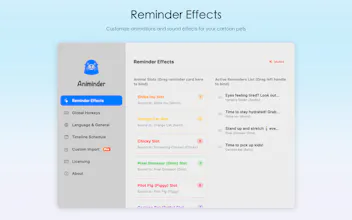
A macOS menu bar app that turns reminders into desktop pet animations. Instead of boring notification banners, cartoon animals run across your screen holding your reminder — a Shiba Inu, stretching cat, screaming chicken & more. Type naturally ("remind me to stretch in 30 min"), enjoy lo-fi BGM, and never miss a reminder again. Fully click-through — never steals focus. 14-day free trial, $1.99 one-time.



Free Options
Launch Team / Built With


Viktor.comAn AI coworker that actually does the work
Promoted
The click-through implementation is genuinely thoughtful. Nothing worse than a productivity app stealing focus mid-flow, and pairing that with the natural language input makes it feel built by people who actually use macOS daily.
@akbulkuzey6558 Thank you — this means a lot! 🙏
The click-through behavior was actually one of the hardest design decisions. Early
versions stole focus like every other notification, and I caught myself getting
annoyed by my own app 😅. That's when I knew the animation HAD to be invisible
to the mouse — your work should never be interrupted just because a cartoon dog
is running across the screen.
Fun fact: I originally designed a "triple-press Esc to dismiss all" gesture — felt
like the most natural panic button. But it required Accessibility permissions to
intercept global keystrokes at that level, which didn't sit right with me for a
cute pet app. Sometimes the best UX decision
is knowing what to cut. ✂️
Really glad that intention came through. Feedback like this makes the late nights
worth it!