
All-in-One Social Downloader
Stop sorting videos by hand. Let the script do it.
17 followers
Stop sorting videos by hand. Let the script do it.
17 followers
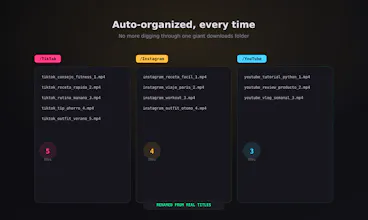
Most downloaders only handle one platform and leave you with files named video_18239123.mp4. This script handles TikTok, Instagram, and YouTube in one run — no watermarks, clean downloads straight from the source. What makes it different: - Paste a list of links, download them all at once - Auto-sorts into /TikTok, /Instagram, /YouTube - Renames each file using the real video title Built for creators and community managers tired of manual sorting. $5, one-time, Python-based.


Payment Required
Launch Team / Built With


FlowmapsPlan your app before you prompt your AI builder
Promoted
Would love to see a built-in option to also grab the thumbnail or cover image alongside each video. Creators usually need the thumbnail for reposting or analytics, and right now that means a second tool. Could you bundle that in for a small price bump?
@selahattinjtpw That's a really good call — a lot of creators have mentioned needing the thumbnail for exactly that (reposting, analytics). Good news: the underlying tool already supports pulling thumbnails, so this isn't a huge lift on my end. Adding it to the list for the next update.
Would love to see a CSV export of the download log with each file's source URL, title, and timestamp. Makes it way easier to hand off to my VA or track what came from where when organizing client content.
@hamdilych Love this one, especially the VA handoff use case — hadn't thought about that workflow specifically. A CSV log with source URL, title, and timestamp is very doable. I'll get this into the next version.
Would love to see a retry option for failed links and maybe a simple progress bar so I know which one is stuck when downloading big batches.
@zgepirazcraq Yeah, that's a fair gap right now — on a big batch it's not obvious where things stand. A retry option for failed links plus a simple progress indicator is on my radar. Appreciate you flagging it.
honestly the auto-sort into folders is the part i care about most, saves me so much time. one thing though, can you add an option to also pull the caption or description text into a sidecar file? would basically make this a complete archival tool for creators like me who need the original post text alongside the video.
@baharalfrnetlj Really glad the auto-sort is pulling its weight for you. And that's a smart addition — a sidecar file with the caption/description would round this out nicely for archival use, especially since the video alone loses context without the original post text. Adding it to the list alongside the CSV log and thumbnail requests others have brought up.
Ran it on a mixed list of 15 links and came back to perfectly named files in their own folders, which is way better than my usual mess of random mp4 names. The auto sorting into separate platform folders is honestly the part that sold me.
@hamza6xrq 15 mixed links and clean folders on the first pass — that's exactly the use case I built this for. Glad the auto-sorting sold you on it, that part took the most iterating to get right.
Thanks for trying it out!
Ran ten mixed links through it last night and it sorted them into the right folders with proper titles, which already saves me more time than the five dollars. The no-watermark Instagram pulls are the real standout for me.
@utku1074360 This made my day 😄 Glad it just... worked on the first real try with mixed links, that's exactly the experience I was going for.
Good to know the Instagram no-watermark pulls are the standout — I'll keep that reliable as I add more to this. If you want to grab it, there's a 20% launch discount running this week with code PH20 👋