Launching today

AirDebug
Wireless ADB for Android, without Android Studio.
2 followers
Wireless ADB for Android, without Android Studio.
2 followers
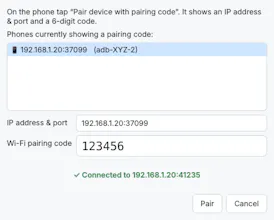
A free, open-source Windows tray app that pairs your Android phone for wireless debugging with a QR code or 6-digit code. No Android Studio, no adb commands. It remembers your phone and reconnects automatically, even when the port changes.


Free
Launch Team

Atlassian LoomHit record, hand off to AI
Promoted
Hey Product Hunt!
I'm John, the maker of AirDebug.
Why I built it: I debug Android apps on a real phone every day, and my USB cable kept failing. Sometimes the phone wasn't detected, sometimes the port was loose, sometimes Windows just decided not to see it. Android 11 added Wireless debugging, which should have fixed this, but pairing is hidden inside Android Studio. If you work in VS Code or the terminal, you end up typing adb pair and adb connect and looking up a port number that changes every time the phone reboots.
So I built a tiny Windows app that does it for you.
What AirDebug does: Pair with a QR code: scan it from the phone, and you're done.e Or pair with the 6-digit code; phones are found on your network automatically.y Auto-reconnect: it remembers your phone and reconnects by itself, even when the IP or port changes. Lives in the system tray, can start with Windows, and notifies you when a phone connects or drops. USB → Wi-Fi for older phones (Android 10 and below). One .exe, no setup. If adb isn't installed, it downloads Google's official Platform-Tools for you. Light and dark mode, English and Bahasa Indonesia
Once connected, your phone works with everything that uses adb: Android Studio, VS Code, Flutter, React Native, scrcpy.
It's free and open source (Apache-2.0), built with Python and PySide6.
I'd love your feedback:
What's your current wireless debugging setup?
Would you want a macOS or Linux version?
Thanks for checking it out!