
AI Usage Ball
Live desktop orbs for Claude, Codex & Antigravity
9 followers
Live desktop orbs for Claude, Codex & Antigravity
9 followers
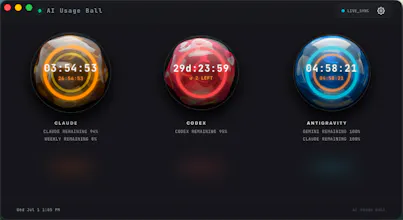
See Claude, Codex / ChatGPT, and Antigravity limits before they interrupt your flow. AI Usage Ball turns remaining allowance and reset times into animated liquid orbs on your macOS desktop and menu bar. It runs locally, talks only to the providers’ own services, and is source-available for audit. Built for Apple Silicon on macOS 12+. Launch offer: the first 100 people who try AI Usage Ball and share genuine product feedback can apply for a free lifetime personal license.


Free Options
Launch Team

SpeedyIndex - Google indexing serviceGet backlinks indexed in Google, pay only for indexed URLs
Promoted
AI Usage Ball is a cool and beautiful tool that lets you see how much usage you have left across your AI tools in real time. I genuinely use it every day.
The first 100 people who try AI Usage Ball and leave genuine feedback can apply for a free lifetime personal license.
@ben_x2 A very promising product and a strong launch. Congratulations to the team! 🚀
Love how local it stays and only hits the providers' endpoints. One thing that would make it even more useful for me: a quick preset view for teams where I can add two or three teammates alongside my own accounts so we can eyeball whether someone is about to hit their cap before it derails a pairing session.
@uri_yap Hey uri_yap — Team View just shipped in v0.3.0, built exactly for what you asked: pin 2-3 teammates and see everyone's remaining % at a glance during a pairing session. Same privacy model you liked — it's opt-in and local-network only, nothing goes through a server, just a name and three percentages broadcast to devices on your own WiFi. Turn it on right from the "Share" button under your orbs, or in Settings. Would love to hear what you think — thanks again for the idea!
Finally gave it a spin on my M2 and the liquid orb in the menu bar actually makes glancing at remaining tokens feel less like checking a spreadsheet. Local-only setup was a nice touch.
A small update from the maker: I have been refining the part of AI Usage Ball that matters most to me — seeing the remaining usage and reset state without opening another dashboard.
The current build keeps Claude, Codex / ChatGPT, and Antigravity in three liquid gauges on macOS. I am now looking for people who use two or more of these tools during real coding work.
If you try it, the most useful feedback is specific: what did you expect the gauge or reset state to mean, and what felt unclear? Positive or critical feedback is welcome.