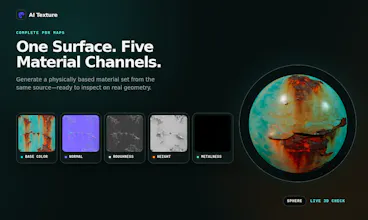
AI Texture turns prompts or images into seamless textures and complete PBR material sets. Generate tileable surfaces, build Base Color, Normal, Roughness, Height, and Metalness maps, inspect results in 2D or 3D, and upscale while preserving seamless edges. Built for Blender, Unreal Engine, Unity, Godot, game development, and archviz workflows.
No reviews yetBe the first to leave a review for AI Texture
Maker
📌
Hi Product Hunt — I’m the maker of AI Texture.
Generating a good-looking image is relatively easy, but turning it into a usable material still involves fixing seams, creating PBR channels, checking how it tiles, upscaling it, and moving between several tools.
AI Texture brings those steps into one workspace.
You can currently:
• generate a seamless texture from a prompt
• generate a texture and complete PBR map set together
• turn an existing image into Base Color, Normal, Roughness, Height, and Metalness maps
• inspect surfaces in 2D tiling and real-time 3D previews
• upscale textures 2x or 4x while preserving seamless edges
The product is designed for Blender, Unreal Engine, Unity, Godot, game development, and archviz workflows. Engine-specific packaging is still being improved, so I’m especially interested in feedback from artists about map quality, tiling artifacts, and what a genuinely useful export workflow should look like.
There is a free tier with starter credits, and the Studio can be explored before generating.
I’d love your honest feedback:
1. Which workflow would save you the most time?
2. What is the first material type you would test?
3. Which PBR channel is most important for you to control?
Thanks for taking a look.
Report
Took it for a spin in Blender and the seamless tiling held up way better than other texture generators I have used, especially on the height map. The 3D preview saved me a ton of guesswork before exporting the PBR set.
Report
Maker
@blahgeputc93775 Really appreciate you putting it through an actual Blender round-trip. The 3D preview was designed exactly for that — reducing the export/import guesswork loop.
Report
A direct export to Substance Painter or at least SBSAR format would save a ton of time for our pipeline, since we still end up rebuilding most materials manually there. Would love to see that bridge.
Report
Maker
@burcubitgen Really appreciate this. Export is in the UI, and engine-specific packaging (including Substance/SBSAR) is exactly what I'm working on right now
Report
The fact that it preserves seamless edges when upscaling is a really thoughtful detail, since that usually ruins tileable textures. Love that it bundles the full PBR map set in one pass too.
Report
Maker
@elanurince86376 Thank you. The upscaling edge problem was one of the reasons I started building this in the first place —it's such a frustrating, invisible step that ruins an otherwise good texture. Glad the bundled PBR workflow worked for you too.
Report
would love to see a way to lock in a specific style or color palette across generations, basically save a preset so i don't have to re-describe the same look every time when generating variations for a scene
Report
Maker
@as_hulya85969 That's exactly the kind of workflow improvement I want to add. Noted - thank you.
Report
Maker
@as_hulya85969 Out of curiosity, what specific styles or color palettes do you find yourself re-describing most often? Knowing which looks people want to lock in first would help me prioritize what to ship as defaults.
Report
honestly the seamless tiling works way better than i expected, dropped in a rough stone prompt and it exported clean normal and roughness maps that dropped straight into my unreal scene without weird edge artifacts. super handy.
Report
The instant 3D inspection right after generating maps is a smart touch, saves so much back-and-forth when dialing in roughness or normal details for archviz scenes.
Report
Maker
@emircan20512 appreciate with your feedback. I am glad this tool can help you on your archviz work
Took it for a spin in Blender and the seamless tiling held up way better than other texture generators I have used, especially on the height map. The 3D preview saved me a ton of guesswork before exporting the PBR set.
@blahgeputc93775 Really appreciate you putting it through an actual Blender round-trip. The 3D preview was designed exactly for that — reducing the export/import guesswork loop.
A direct export to Substance Painter or at least SBSAR format would save a ton of time for our pipeline, since we still end up rebuilding most materials manually there. Would love to see that bridge.
@burcubitgen Really appreciate this. Export is in the UI, and engine-specific packaging (including Substance/SBSAR) is exactly what I'm working on right now
The fact that it preserves seamless edges when upscaling is a really thoughtful detail, since that usually ruins tileable textures. Love that it bundles the full PBR map set in one pass too.
@elanurince86376 Thank you. The upscaling edge problem was one of the reasons I started building this in the first place —it's such a frustrating, invisible step that ruins an otherwise good texture. Glad the bundled PBR workflow worked for you too.
would love to see a way to lock in a specific style or color palette across generations, basically save a preset so i don't have to re-describe the same look every time when generating variations for a scene
@as_hulya85969 That's exactly the kind of workflow improvement I want to add. Noted - thank you.
@as_hulya85969 Out of curiosity, what specific styles or color palettes do you find yourself re-describing most often? Knowing which looks people want to lock in first would help me prioritize what to ship as defaults.
honestly the seamless tiling works way better than i expected, dropped in a rough stone prompt and it exported clean normal and roughness maps that dropped straight into my unreal scene without weird edge artifacts. super handy.
The instant 3D inspection right after generating maps is a smart touch, saves so much back-and-forth when dialing in roughness or normal details for archviz scenes.
@emircan20512 appreciate with your feedback. I am glad this tool can help you on your archviz work