
AgentPeek
Claude Code & Codex in your Mac notch
328 followers
Claude Code & Codex in your Mac notch
328 followers
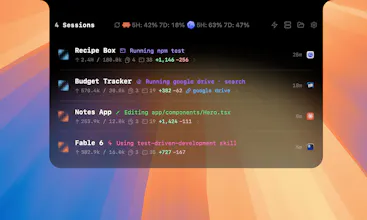
AgentPeek lives in your Mac notch and menu bar and shows your Claude Code and Codex sessions in real time, so you can glance up instead of digging through windows. See active sessions, permissions, token usage, and local dev servers at a glance, across terminal and desktop. Your session data stays local on your machine. Native, fast, and built for anyone running AI coding agents all day.
This is the 2nd launch from AgentPeek. View more
AgentPeek
Launched this week
You're running more coding agents than ever, but you can't keep up with them. That's where AgentPeek comes in. It pulls every session up into your Mac notch, live. Glance up, approve a prompt, watch token usage and manage the entire flow without pausing your YouTube video. All local, all yours.





Free Options
Launch Team

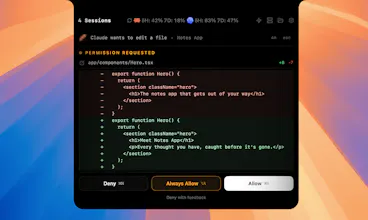
approving permission prompts from the notch without switching windows is the real feature here. that context switch of jumping to a terminal just to hit y and then going back to what you were doing adds up fast when you're running multiple sessions. does it support any kind of auto-approve rules for low risk operations or is every prompt manual? would love a way to say "always allow file reads in this repo" without having to approve each one individually.
AgentPeek
@tina_chhabra Every permission prompt in the notch has an "Always Allow" action next to approve and deny. Tap it once and AgentPeek hands the rule back to Claude Code, which saves it into its own permission settings. After that, Claude Code's native allowlist matches the call and stops firing the hook, so the prompt never reaches you again.
running 3-4 Claude Code sessions at once is where this starts making real sense. the thing i keep bumping into though - does it show aggregate token spend across all sessions? each session looks fine individually but cumulative burn across 4 parallel agents adds up way faster than expected. a total daily spend view would make the budget awareness actually useful
AgentPeek
@omri_ben_shoham1 I will add this in the token usage view, thank you :)
The notch placement is smart — babysitting Claude Code/Codex runs is exactly the dead time I want back without alt-tabbing to a terminal. How does AgentPeek actually read session state: is it tailing the local CLI logs/JSONL transcripts on disk, or hooking the process, and does any of that session content ever leave the Mac? For a tool watching my coding-agent output, fully-local with nothing phoned home is the dealbreaker either way.
AgentPeek
@hi_i_am_mimo Native hooks!
I didn't know what mac notch is, and now i downloaded it. any plans to make it hermes compatible? I know session mngment is less of an issue there but some of us have more than two harnesses.
Congrats on the launch. Trying it out right now!
Also very cool landing.
AgentPeek
@arjinroni I will look into more compatibility, Hermes has grown so fast! Thank you :)
The local-only session view is the important part here. Once coding agents touch real repos, the hard problem becomes knowing what is running, what is blocked on a human, and what can safely be approved without turning the whole workflow into a terminal babysitting loop.
AgentPeek
@krekeltronics Thank you! Always in the loop :)
The permission-prompt piece is the part I'd care about most. I lose track when Claude Code is waiting while another agent is still running. Curious if you plan to show blocked vs still executing as separate notch states?
AIQRHub
Congrats on AgentPeek — the notch/menu bar angle for Claude Code is really clever.
Saw two r/ClaudeCode threads today that match what you're building:
1) User on 5x sub sees usage around 40%, then gets locked at 100% with almost no warning — classic "usage meter you can't trust" pain.
2) Desktop SSH dev works fine, but UI stuck on "Reconnecting to root@..." — people think the session is broken when it isn't.
Worth a glance if you're looking for early users venting about session/usage visibility. Happy to share the links if useful.