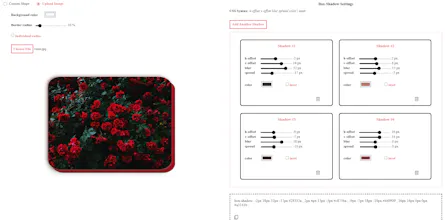
A box-shadow visual generator that helps you generate box-shadow CSS declarations for HTML elements. This generator allows you to attach as many shadows as you like to an element. You can copy the box-shadow CSS declaration generated at the bottom of the page
Hi everyone! Thank you so much for giving Advanced Box Shadow CSS Generator a try. I built this generator because I wanted a quick way to view and adjust the different shadows attached to an element. Whenever I’m web developing and want to add box-shadow to make the elements realistic, I find that adjusting multiple shadows in order to create a cool effect can be very time-consuming. Shadows can add so much dimension to an element and make it nearly realistic if done right. When multiple shadows are added to an element, it creates interesting effects and illusions that can help elevate a website’s overall look. But wanting to add a lot of shadows can be a daunting task, with so many values and options available. The Advanced Generator can help make this process easier and more fun by visualizing the shadows instantly after you adjust the box-shadow settings. You can add as many shadows as you want to an element and can adjust each one individually to your liking. The generator will compile all your adjustments so far and generate a box-shadow CSS declaration for you to copy later.
The generator is not perfect and I’m still working on making it even better. If you have any feedback please feel free to share, I want to improve this generator further and your comments would really help.
Thank you so much.


Marketing Reading Materials