Academic Second Brain

Academic Second Brain

second brain, research, academia

4 followers

The ultimate research system for Notion seamlessly combines tasks, notes, reading materials, projects and many more features - creating one page to store all relevant and important information related to your research or studies.
Academic Second Brain gallery image
Payment Required
Launch Team
Framer
Framer
Launch websites with enterprise needs at startup speeds.
Promoted

What do you think? …

Aliyar Azimov
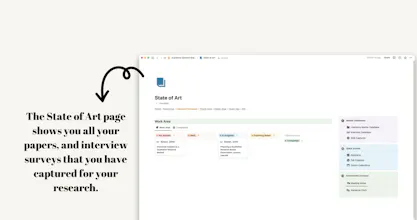
Hey all! 😀 A few months ago, I launched my very first product and received tons of reviews and feedback. I’m excited to share my template, Research Brain, with you today. I’ve been using Notion for almost 3 years for my research and personal life. Since then I’ve always wanted to create a truly all-in-one system for my personal productivity and knowledge management system within it. Most probably, as a student or researcher, many of you know how collecting all notes, papers, and knowledge into one place is hard and challenging. Especially, when you have to connect them to each other and understand the research. I always wanted a place to track my tasks, projects, assignments, credits, and classes, as well as take notes, clip web pages and highlights, review my papers, and so on. Academic Second Brain is that system. It’s a template that you truly rely on and build a solid system that can work through your research. I’m confident that this template will make your life easier as I made it as simple as possible. While building this template, my goal was to reduce the complexity, remove unnecessary options, and keep it minimal and clean. That’s why I’ve got never been distracted while working on my thesis. By systematically managing knowledge, the workspace enables the user to work more efficiently and effectively while enhancing creativity. You can easily track progress on research projects while keeping track of notes and materials related to specific courses you are taking (or teaching). This workspace has been (and still) an invaluable tool for me as a PhD researcher, and I firmly believe that it could also be an asset to others who seek to optimize their work and manage their personal and professional lives more efficiently. What this template offers 👇🏻 🗂️ Databases for project and life management 🎯Tasks database: This database allows you to sort your tasks by, for instance, deadline (due date), when you plan to do the task (do date), and by priority. ⏱️ Projects database: Project pages allow you to store all of the details relevant to a given project in one place: related tasks, references, reading notes, and general resources. 🔮 Areas database: Areas are spheres of activity or responsibility that you need to maintain indefinitely. Examples include political engagement, your health, work admin, etc. These pages function similarly to projects, but they don’t have an end date and can themselves contain multiple projects. 🗂️ Databases for knowledge management 📚 Reference database: This database is for keeping track of your notes on academic references: journal articles, books, conference papers, etc. You can connect this database to Zotero to manage your references effectively throughout your research. 🌐 Resources database: Academic references are not the only resources you need to keep track of in your research. The General Resources database stores and organises meeting notes, class syllabi, admin documents, videos, webpages, etc. 👨🏻‍💻 People database: In academia, specifically in social sciences, you may seek interview surveys, consultations, etc. This database allows you to track your progress as well as knowledge gained during the sessions. 📝 The Dashboard On a day-to-day basis, you’ll likely spend most of your time in the Dashboard. Here you’ll find custom views of many of the databases reviewed above. You’ll also find some Quick action buttons to create new database entries and space for any fleeting notes you need to jot down during the day. 📌 Comprehensive Beginner’s Tutorial 🎉 This template comes with a comprehensive tutorial guide with an interactive demo version of the template with tons of examples. 👉🏻 If you have any questions, I’ll be there to answer all of them! 🚀 Jump over to Gumroad to find a full product description. 🔥 Use “BRAIN25” at checkout to take 25% off!
Anastasiia Veselova
As a product strategist, I would like to express my sincere appreciation for the makers of Academic Second Brain for going above and beyond in creating a truly exceptional product. The features included in this second brain tool are outstanding and will surely benefit many academics who are looking for an efficient way to organize and store their research notes. I would like to extend a heartfelt thank you to the makers of Academic Second Brain for taking the time and effort to develop such a remarkable tool that will make a significant difference in the lives of academics everywhere. What inspired you to create this product, and how do you envision it helping academics in the years to come?
Aliyar Azimov
@anastasiia_veselova Thank you very much for your kind words and feedback. I hope it will help you leverage your research in the future :)
Anastasiia Veselova
@azimoff It would be great to support each other during the launch process :) Here is my story — https://www.linkedin.com/feed/up... I invite you to try out Lumos and experience its power firsthand. So, what are you waiting for? Download the app today and see the incredible future we have in store! https://lnkd.in/d4FhRKqT Don't hesitate to text me back if you have any questions during the registration process. I appreciate your support, and we can’t wait for you to join our Lumos community! Stay tuned. We'll roll out Lumos' launch at Product Hunt very soon. https://www.producthunt.com/prod...