
Launched this week

Aaavatar
Branded team headshots in one drop
348 followers
Branded team headshots in one drop
348 followers
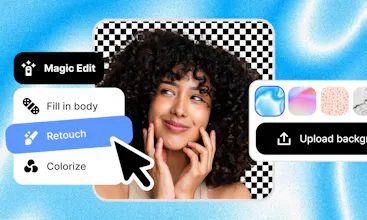
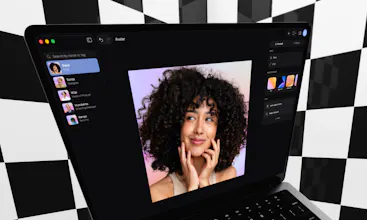
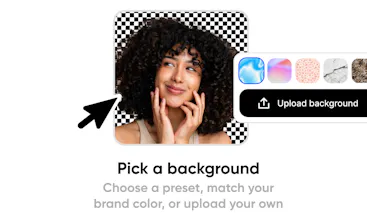
Drop one or more profile photos into Aaavatar. Backgrounds is removed, colors balanced, missing pieces restored in one click, everyone aligned, and exported in every format you need. Built for HR and design teams maintaining a branded team gallery.




Aaavatar
12 years ago, during a summer break from college, I worked at a Dutch design agency called Today. For two weeks straight I sat in Photoshop, cutting out 100+ Shutterstock photos with the pen tool for a brand concept that combined two images at a time. Simple shapes were fine. Hair was the patience test. When Photoshop later shipped the smart brush and refine-selection with onion mask, I thought it was magic.
Fast forward to today and that whole problem is solved a hundred times over. Figma has background removal built in. There are countless one-click tools. So why build another one?
Because at Online Payment Platform, where I work with now, the team is growing fast and every new hire needs a branded headshot. Same backdrop for everyone, color-balanced, exported in the right formats, named carefully so HR can find them later. Lily from HR was doing all of that in Figma, at €80/month per seat. Other tools existed, but none of them matched her workflow end-to-end. So I built one that did.
What Aaavatar does:
- Drop one or more colleagues into the app
- Backgrounds removed automatically
- Refine colors and restore missing pieces in one click
- Everyone aligned at roughly the same height
- Exported to every format you need
Pricing:
- Free: 3 cutouts on the main AI model + 3 on a lighter model
- Pro: unlimited
It's MacOS only for now. Would love to hear what you think, especially if you've ever wrangled team photos yourself.
showmd
@thierry_emmery oh boy, i did the same as you did 12 years ago. this was soo annoying. great that this is finally solved!
Aaavatar
@jollife The struggle was real, but a great way to train your perseverance! 😂
@thierry_emmery Since this is MacOS only, is the processing happening locally on the machine or via a cloud API? For teams with strict privacy requirements regarding employee photos, a local-first approach would be a huge selling point. The UI looks incredibly clean, by the way.
Aaavatar
@priya_kushwaha1 Currently it does both!
Aaavatar has a toggle to turn off the cloud model for background removal, when off, it falls back on Apple's own Vision models (VNGenerateForegroundInstanceMaskRequest + person segmentation). At first glance the local path holds up, but it's noticeably weaker on fine hair edges.
For the cloud path it uses:
BiRefNet for cutouts;
FLUX.1 Fill Pro for outpainting/canvas-extension;
And DeOldify for colorizing B&W photos.
I agree with you, initially I wanted to go fully local, but tuning the on-device models to match takes real time, model file size can be quite big, so I chose the speed and quality of cloud models to get to market validation first. Though, I believe you're right: fully local is most likely a huge selling point.
RiteKit Company Logo API
@thierry_emmery This is a great example of solving a real workflow problem rather than just automating a commodity task. The fact that Lily's process was spread across Figma + manual exports + naming conventions is exactly the kind of friction that doesn't show up in feature lists but drives people crazy daily. Sounds like you nailed the end-to-end experience.
Aaavatar
@osakasaul Thanks Saul! Yeah, it's those small tedious tasks that quietly drain your time. And honestly, using Figma just for this feels like overkill given the cost.
Aaavatar
@anusuya_bhuyan Hey! Aaavatar has a feature called Magic Retouch which currently looks at each photo on its own and auto adjusts the tone, adds a touch of warmth and a subtle shadow lift to open up faces. Making it look across the whole team set so the lighting actually matches between portraits is a great idea, adding it to the list. Thanks! 🙏
This solves a surprisingly annoying problem. When we were growing our engineering team fast, keeping consistent team photos was one of those tasks nobody owned but everybody noticed when it looked messy. The fact that you built this specifically for HR and design teams shows you understand who actually deals with this pain day-to-day. Nice execution.
Aaavatar
@avrisimon Thanks Avri! If you happen to try Aaavatar out, please let me know how it goes! 🙌
"missing pieces restored in one click" — what was the closest existing option before you built this, and what specifically about it pushed you to start over instead of contributing? Always interested in the moment someone decides a fresh codebase is the right call.
This is one of those tools that solves a problem nobody talks about but everyone has. Every time we onboard someone new, the "team page headshot" task turns into a whole thing - someone sends a photo with a messy background, another person sends one that's completely different lighting, and our designer spends an hour making them all look like they belong on the same page. Quick question: can you lock in brand settings (specific background color, crop ratio, padding) so that every new photo you run through automatically matches the rest of the gallery?
Build Check
Simple but powerful. Love this kind of tools. Wish you all the best here Thierry!
Aaavatar
@german_merlo1 Thanks Germán, hope Aaavatar saves you some time!
Perspective
I am pretty sure I have photoshopped over a 1.000 profile pictures. So all I can say is, THANK YOU!