Zone Share-Ultrawide Screen Sharing Tool

Zone Share-Ultrawide Screen Sharing Tool

Share just a portion of your screen and blur sensitive data

133 followers

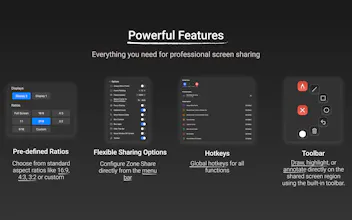
Struggling to share your ultra-wide screen in video calls? You do not want to share sensitive data to your audience? Share Zone lets you mirror a portion of the screen while blurring selected apps or even browser tabs to keep your privacy safe. ✅ Custom screen area selection with adjustable size & position ✅ Predefined aspect ratios like 16:9, 4:3, 21:9 etc. ✅ Toolbar to annotate directly on the shared content ✅ Blur select apps, browser tabs or the whole content ✅ Global hotkeys ✅ And more
This is the 3rd launch from Zone Share-Ultrawide Screen Sharing Tool. View more

ZoneShare

Perfect screen sharing for ultrawide monitors | macos app
Struggling to share your ultra-wide screen in video calls? You do not want to share sensitive data to your audience? Share Zone lets you mirror a portion of the screen while blurring selected apps or even browser tabs to keep your privacy safe. ✅ Custom screen area selection with adjustable size & position ✅ Predefined aspect ratios like 16:9, 4:3, 21:9 etc. ✅ Toolbar to annotate directly on the shared content ✅ Blur select apps, browser tabs or the whole content ✅ Global hotkeys ✅ And more
ZoneShare gallery image
Free Options
Launch tags:ProductivityPrivacyMeetings
Launch Team
AppSignal
AppSignal
Get the APM insights you need without enterprise price tags.
Promoted

What do you think? …

Kewitschka
Hi everyone! 👋 I’m the creator of Zone Share. I spent the last few months building this app after a recurring frustration: my audience couldn't see anything on my shared ultra-wide screen because the text was just too small. Over and over again. The only solutions were to share just a single window or use "overkill" software that felt too heavy for me. I wanted a lightweight tool that is in the Menu Bar, ready the moment I need it. The latest update was a huge milestone for me. After accidentally sharing a private WhatsApp conversation with my entire office 🙃, I finally built the feature I had in my mind for a long time: Smart Blurring. You can now select specific apps (like WhatsApp or ChatGPT) or even certain browser tabs that will automatically blur the moment they appear in your shared zone. It’s been a total game-changer for my focus—I can finally present without worrying about my privacy. I’d love to hear your thoughts! Do you find this useful for your workflow? Are there any features missing? All feedback is greatly appreciated! 🙂
Anton Loss

Great idea, for someone with 5k screen it was always problematic to share and record screen!

Congratulations on your launch! 🚀

Kewitschka

@avloss Thank you very much!

Theo Crewe-Read

This looks great, congratulations!

Kumar Abhishek

Wow, unique idea indeed and a good pain point to solve for sure!

Kewitschka

@zerotox Thank you for the feedback!

Jay Dev

Wow, Zone Share looks amazing! The selective blurring feature is a lifesaver for privacy during calls. Does it work with native Mac apps too, or just browser-based ones?

Kewitschka

@jaydev13 Thank you for the feedback! It works with native apps too. You can blur all windows of an app or only selected windows.