Yizy

Yizy

Give meaning to your screenshots and bookmarks

0 followers

Design is a continually changing environment. What’s cool one day, is old the next. So designers always have to be on their toes - it’s a pretty hectic gig. And this is where Yizy comes into play!
Yizy gallery image
Yizy gallery image
Yizy gallery image
Yizy gallery image
Yizy gallery image
Yizy gallery image
Yizy gallery image
Yizy gallery image
Yizy gallery image
Launch Team
OS Ninja
OS Ninja
Explore and Learn Open Source using AI
Promoted

What do you think? …

Andra Aru
Wow, this is really cool stuff! Congrats! Can i use yizy with out chrome extension?
Eyobiel
@andraaru Thank you so much Andra 😊 Yes you can use Yizy with out an extension although you may miss on some special functionalities of the extension!
Anton Mishin
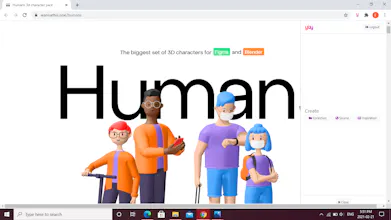
Hi, from the creator of Humans 3d character pack P.s. nice product!
Eyobiel
@anton_mishin I can't believe it, i love your platform design and all the characters that is why i wanted to use it as a demo for my product 😍 thank you so much for your feedback!
Anton Mishin
@yizy appreciate it!
Glen Creaser
This looks so cool. How does pricing work?
Eyobiel
@glen_creaser Hi Glen thanks for checking my product out😊 we two plans one monthly($2) and one yearly ($20) but they both have 14 day trial and you can cancel anytime! Let me know if you have any questions, thanks!
Eyobiel
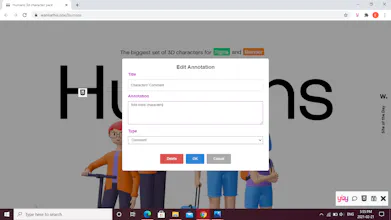
Greetings Everyone😊, I was a freelance web designer for 2 years and a lot of my time would involve cool looking websites. Often, I’d use a tool like Evernote to capture great designs and write notes about them. These notes usually involved the color palette and fonts used. It got extremely tedious continually ‘inspecting’ websites and typing up notes - I really didn’t have the time. Then is when I thought about building a micro-SaaS app that can solve this. Yizy uses a web browser extension to bookmark a website, take a screenshot of the current page and automatically pull in relevant information, such as color palettes and CSS property, from the page source. It also allows you to put both Comment and CSS annotations on your screenshots and images. The CSS annotation includes CSS properties of any selected part of a web page being screenshot (pulled automatically from the website). On your dashboard, you will see three Categories: Inspirations, Sources and Collections. Any screenshot or image uploaded on Yizy is found in Inspirations. The URLs (website addresses) saved can be found in Sources. Collections is like a folder for Inspirations (e.g. Images) and Sources (e.g. URL) you wish to save in. Every Inspiration, Source, or Collection is taggable and can be easily searched in the “Search” toolbar by either Keyword or Tag or both. I really appreciate your feedback and taking the time to check it out!
Haris Sohail
Yizy is a great tool. I am a Product Manager and one of the things that keeps derailing our project off track is time it takes in meeting to review websites -> provide feedback -> make changes -> review again. This process is quite hectic. Yizy helped us in making these things smoother as we can comment directly on websites and it is easier for our developer to make those changes then. Oh, and it also helps you store screenshots on any device which is pretty cool. Definitely recommended!
Eyobiel
@haris_sohail Thank you so much Haris, I appreciate your kind words! I am glad Yizy was able to bring value to your organization and ease your web designing experience😊
Noman
Amazing product, Man! Keep going.
Eyobiel
@neionbau Thank you so much for your kind words😊