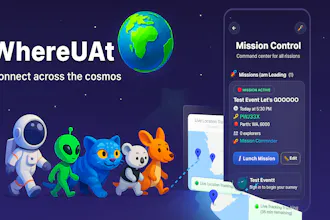
Most event apps focus on tickets and big conferences. WhereUAt is for everyday meetups—sports, home parties, coffee catch-ups—where the real question is “Are they coming or should I keep waiting?” It shares live location only from 15 minutes before to 15 minutes after the event, then turns off automatically.
I play soccer every Saturday morning at 7:30am with more than 20 people. In reality, it never actually starts at 7:30. Some people are on time, some are 20–30 minutes late, and some just sleep in. It became really hard to keep messaging everyone: “Are you coming?”, “How far are you?”, “Should we start without you?”
That’s where the idea for WhereUAt came from. I didn’t want full-time tracking or a complicated system — I just wanted a simple way to see who’s actually on their way, so the people who woke up early aren’t standing around wondering if there will even be enough players to start a game.
Over time, the approach shifted to be very focused and intentional:
real-time location only from 15 minutes before to 15 minutes after the event start time, then it automatically turns off. No history, no all-day tracking, just a tiny window around the event when this information really matters.
For this launch, I’m hoping to hear from other “organiser friends” — sports captains, hosts, group admins — on what would make this even more useful, and how to keep the balance between convenience and respecting everyone’s privacy. 🙌
Report
@jinwoo_dev_kr Love this, the problem is so real. Every group has that mix of early birds, late-risers, and “I’m 5 minutes away” people who are actually still in bed 😅. The 15-minute tracking window is such a smart, respectful approach… just enough info to help the organizer, without crossing into all-day location sharing.
This feels especially useful for anyone running weekend sports, hiking groups, meetups, or even casual dinners where timing matters.
Curious: are you thinking about adding small features like quick status buttons (“Running late”, “Parking”, “Just left”) for people who don’t want to share location at all?
Congrats on the launch, this solves a universal pain point in such a clean, thoughtful way.
@fernando_scharnick Hi Fernando, thank you for all supporting words and I really appreciate for that. And also WOW! for small feature! I love that idea. I will try to implement that feature within a few weeks!
Ah! This was my idea back in 2015. 10 years later, you made it. Great!!
Back then, my UI/UX was also crappy. I could only make half of it, as the GPS and the connectivity weren't that great as well. But congrats on building this. I'll use it if you bring it up for Android :)
This is so practical for anyone organizing group stuff. The 15-minute window is smart - just enough info without feeling invasive. Congrats on the launch!
@alejandroesquivel Thank you so much. It is available in iOS and Android both. Please try this app to organise the event and let me know how did it go!
@busmark_w_nika Location will be shared with people attending the event. Also, this if you turn off the permission, it will not be shared too! So, this will be ideal for sports team or when people know each others!




WhereUAt
@jinwoo_dev_kr Love this, the problem is so real. Every group has that mix of early birds, late-risers, and “I’m 5 minutes away” people who are actually still in bed 😅. The 15-minute tracking window is such a smart, respectful approach… just enough info to help the organizer, without crossing into all-day location sharing.
This feels especially useful for anyone running weekend sports, hiking groups, meetups, or even casual dinners where timing matters.
Curious: are you thinking about adding small features like quick status buttons (“Running late”, “Parking”, “Just left”) for people who don’t want to share location at all?
Congrats on the launch, this solves a universal pain point in such a clean, thoughtful way.
WhereUAt
@fernando_scharnick Hi Fernando, thank you for all supporting words and I really appreciate for that. And also WOW! for small feature! I love that idea. I will try to implement that feature within a few weeks!
Swytchcode
Ah! This was my idea back in 2015. 10 years later, you made it. Great!!
Back then, my UI/UX was also crappy. I could only make half of it, as the GPS and the connectivity weren't that great as well.
But congrats on building this. I'll use it if you bring it up for Android :)
WhereUAt
@chilarai Hi, it is available in both platform ( iOS and Android ). Please search 'WhereUAt' in google play store
Swytchcode
@jinwoo_dev_kr Awesome!
Snowglobe
This is so practical for anyone organizing group stuff. The 15-minute window is smart - just enough info without feeling invasive. Congrats on the launch!
WhereUAt
@alejandroesquivel Thank you so much! Please use this app and let me know any feedback!
WhereUAt
@alejandroesquivel Thank you so much. It is available in iOS and Android both. Please try this app to organise the event and let me know how did it go!
minimalist phone: reduce your screentime
Good idea – but is it safe to share your location like this? Who else can see it?
MultiDrive
@busmark_w_nika I guess only it's visible only when you are sharing it. Am I right?
WhereUAt
@busmark_w_nika Location will be shared with people attending the event. Also, this if you turn off the permission, it will not be shared too! So, this will be ideal for sports team or when people know each others!
Hope this helps.
minimalist phone: reduce your screentime
@jinwoo_dev_kr Thank you for the clarification.
WhereUAt
@busmark_w_nika Your welcome! Any question, feel free to ask!