WhenAre

WhenAre

Intuitive timezones for your remote team 🌍

4 followers

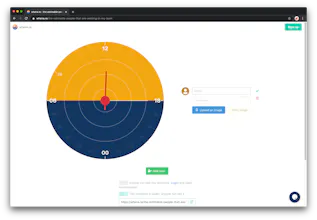
Don't waste time over timezone-quiproquos anymore. Check WHEN are the members of your remote team, freelancers or customer, and be more mindful of everyone's time.
WhenAre gallery image
Launch Team
Intercom
Intercom
Startups get 90% off Intercom + 1 year of Fin AI Agent free
Promoted

What do you think? …

Nastya Mikeyeva
@laurentsenta Thanks for organizing remote work!
Laurent Senta
@mikeyeva Thanks for the feedback Nastya, do you intend on using it with a team? Customers? Or another group?
Nastya Mikeyeva
@laurentsenta I was going to use it with ream, but now I also will use it with freelancers!
Laurent Senta
Hello Product Hunt, I've been working remotely for a few years now, and I missed a few meetings over "Timezone Quiproquos." I never found THE intuitive timezone tool, so I built it. Who needs this? People working remotely! Teams, AND more: freelancers and their clients will find this useful too. I even use a clock to sync with friends. It's also useful to "meet" a team: I send this tool to a client recently; they add themselves AND the rest of their team. Boom: I get a simple overview of the whole team, insiders, contractors, and timezones included. Nicer than scrolling through Slack Channels. Want a tip? You can use any URL, and signup to "lock" it. For example, https://whena.re/remote-ceos is a valid clock. You can use names that are easy to remember, or names that are difficult to find by chance. Next versions, I plan to focus on integrations. I want to make this accessible INSIDE Slack, Trello, and others. Let me know if there's a way to make this more useful for you! Byt the way, it's the V2 of a previous product "timezown", it has a share feature now, it's much faster, and works on mobile.
Dmitriy A.
@laurentsenta grat app. I was struggling with timezones as well as my team mates, as some zones has daylight savings and others not, at least every few months someone were too early or too late for the call. I have a comment about functionality: can't find some cities, like Charleston SC, NYC, and other US cities.
Laurent Senta
Glad to know you find this helpful @smart_egg. Do you intend to share a clock with your team? Thanks for the precise feedback, what do you think of having a map where you can click on the city directly? I've found so many list of timezones / city, in the end this looks much more intuitive.
Dmitriy A.
@laurentsenta thank you for quick response. 1. No, no plans for sharing, going to use myself; 2. No need for map, moving cursor around is waste of time, hitting [Tab] and typing name of the city in, more efficient; This is about productivity in the first place right? (no one going to scroll, it's about typing); Keep it up! Great Idea and MVP
PL
Awsome ! As a member of a remote team, I think we could really use this !!
Laurent Senta
@pldespaigne Hehe, glad to know this will be helpful, send me a capture when you get this setup!
Yohann Nikas
It's a simple and light answer to the timezone problems encountered by some international teams.
Laurent Senta
Thanks for the feedback @yohann_nikas !
Nathan Chase
I tried to customize the URL, but it doesn't seem to allow any changing of the URL from the auto-generated slug - before or after "locking" it. Also, would be nice to be able to mouseover the avatars on the clock and show their name and timezone, in case some users don't upload an avatar. Had a few people not understand they had to click the green check mark to "save" their user profile as well. Maybe a more explicit "SAVE" button would be helpful in that regard.
Laurent Senta
Hey @nathan_chase thanks for your feedbacks, it's true, each URL is a single clock, you may share it using the input but you can't rename a clock. I'll make this clearer, or let users rename a clock. Agreed and agreed your last two points, this'll be on the next update ;)
Alex Papageorge
Love this. Simple and solves a common problem. I'll check it out this weekend.
Laurent Senta
@alex_papageorge Thanks for the nice words Alex, let me know when you start using it!
12
Next
Last