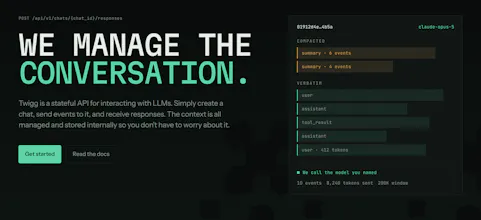
Twigg is a stateful API for interacting with LLMs with no lock-in. You create a chat and send the next event. Twigg then fits your chat’s context to the requested model’s schema, compacts and truncates if needed, and routes it to the LLM. With a Dashboard to control tool schemas, system prompts, context windows and track usage and billing. Designed for building personal agents or ChatApps without the headache of managing and hosting context and provider lock-in.
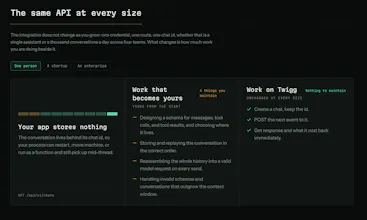
Twigg is a stateful API for calling LLMs. Instead of rebuilding and resending your whole conversation on every request, you create a chat once and send only the next event. Twigg holds the state: it fits context to the target model's schema, compacts or truncates when it runs long, and routes the call. Control tool schemas, system prompts and context windows from the dashboard, and track usage and billing. Build anything from personal agents to enterprise apps. You never manage context again.
We've spent the last year building AI workspaces, and before every new launch we'd end up re-engineering the same thing: the context layer. Where the conversation lives, how it gets fitted to a model's context window, how tool calls and files get replayed.
What we really wanted was a hosted, stateful LLM API that didn't only work with one provider. Something like OpenAI's Responses API crossed with OpenRouter. We didn't want to spend time building infrastructure and code that weren't core to our product.
Since we'd already built most of the pieces, we turned them into Twigg: the stateful API for every LLM.
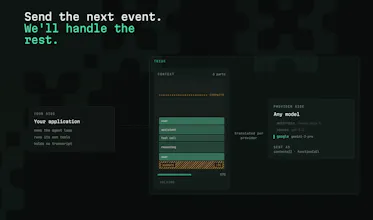
How it works: you create a chat and get back an ID. From then on you only send the next prompt or tool result. You don't send, or even store the context. Twigg manages that for you. Want a different model? Change one field on the next request. Twigg will fetch, assemble and fit the context to the right schema and send back the response. It even auto-compacts conversations, so you never have to worry about a chat getting too long. The idea is to move all the boilerplate logic and infrastructure LLM apps need behind one unified API.
v0.1.0 is live today. It includes namespaces for organising chats per user, a dashboard for system prompts, tool schemas and context budgets. It also track per-run cost and usage so you can bill your own users. Point your agent at twigg.ai/llms.txt for the full rundown!
We'd love to hear what you think, and whether anyone else has had the same context frustrations we have.
@naimz Not in V1. We've deliberately kept the API as simple as possible, so that building with it, or wiring it into an existing project is an easy job.
That said, it's a small addition on our side, the state model makes it very easy.
Would you be using it to run two tool choices and accept the best one into the context, or would you keep the two streams alive in parallel?
Report
This sounds really, really convenient since I spend so many tokens on just having Claude understand all the context for my projects
the truncate/compact-to-fit-schema part is the piece I always end up hand-rolling badly. curious how Twigg decides what to drop when a chat outgrows the target model's context window - is it a simple oldest-messages-first trim, or does it try to preserve things like pinned system instructions and tool call results that a later turn still depends on?
@galdayan Great question. We do all of the above, and let the customer choose the behaviour that fits their use case, because the right answer depends on what you're building.
We first retain the important stuff. System prompts and tool schema are always visible. We also allow the user to choose to pin the first few prompts. This is for agentic work, as the first prompts usually define the high level goals.
From there, it's up to you:
For a simple chatbot you can choose to drop old history, so you don't pay summary costs. For a long-running agent, you can use comapction. Twigg summarizes an older context and keeps recent turns verbatim. You can trigger this eagerly, so your agent is never waiting for a summary. From then you can map out the context window. If you expect to see a lot of images, you can configure Twigg to keep them deep in the history. Same for any file type and tools.
You basically map out your ideal context window in the dashboard. Choose where, and for how long in the history you have summaries, images, truncate tool calls e.t.c
The nice thing is that you can switch between these live, and the context assembly will follow. If you agent is dropping old images and it's breaking the workflow, just turn it off in the dashboard. The next call will bring those images back. When we drop or truncate context it's not a permanent change, its a context assembly policy, so you can experiment with what works best!
@matti_de_beer that's a really clean answer, the "not a permanent change, just a policy" framing especially. one more thing I'm curious about - when compaction summarizes an older chunk, does the summary get regenerated as the conversation keeps growing, or is it frozen once written and just pushed further back in the history?
Twigg
Hi Product Hunt
We've spent the last year building AI workspaces, and before every new launch we'd end up re-engineering the same thing: the context layer. Where the conversation lives, how it gets fitted to a model's context window, how tool calls and files get replayed.
What we really wanted was a hosted, stateful LLM API that didn't only work with one provider. Something like OpenAI's Responses API crossed with OpenRouter. We didn't want to spend time building infrastructure and code that weren't core to our product.
Since we'd already built most of the pieces, we turned them into Twigg: the stateful API for every LLM.
How it works: you create a chat and get back an ID. From then on you only send the next prompt or tool result. You don't send, or even store the context. Twigg manages that for you. Want a different model? Change one field on the next request. Twigg will fetch, assemble and fit the context to the right schema and send back the response. It even auto-compacts conversations, so you never have to worry about a chat getting too long. The idea is to move all the boilerplate logic and infrastructure LLM apps need behind one unified API.
v0.1.0 is live today. It includes namespaces for organising chats per user, a dashboard for system prompts, tool schemas and context budgets. It also track per-run cost and usage so you can bill your own users. Point your agent at twigg.ai/llms.txt for the full rundown!
We'd love to hear what you think, and whether anyone else has had the same context frustrations we have.
Thanks for checking it out!
Mailwarm
Does Twigg support branching chats, like trying two different tool choices from the same context?
Twigg
@naimz Not in V1. We've deliberately kept the API as simple as possible, so that building with it, or wiring it into an existing project is an easy job.
That said, it's a small addition on our side, the state model makes it very easy.
Would you be using it to run two tool choices and accept the best one into the context, or would you keep the two streams alive in parallel?
This sounds really, really convenient since I spend so many tokens on just having Claude understand all the context for my projects
Dial
the truncate/compact-to-fit-schema part is the piece I always end up hand-rolling badly. curious how Twigg decides what to drop when a chat outgrows the target model's context window - is it a simple oldest-messages-first trim, or does it try to preserve things like pinned system instructions and tool call results that a later turn still depends on?
Twigg
@galdayan Great question. We do all of the above, and let the customer choose the behaviour that fits their use case, because the right answer depends on what you're building.
We first retain the important stuff. System prompts and tool schema are always visible. We also allow the user to choose to pin the first few prompts. This is for agentic work, as the first prompts usually define the high level goals.
From there, it's up to you:
For a simple chatbot you can choose to drop old history, so you don't pay summary costs. For a long-running agent, you can use comapction. Twigg summarizes an older context and keeps recent turns verbatim. You can trigger this eagerly, so your agent is never waiting for a summary. From then you can map out the context window. If you expect to see a lot of images, you can configure Twigg to keep them deep in the history. Same for any file type and tools.
You basically map out your ideal context window in the dashboard. Choose where, and for how long in the history you have summaries, images, truncate tool calls e.t.c
The nice thing is that you can switch between these live, and the context assembly will follow. If you agent is dropping old images and it's breaking the workflow, just turn it off in the dashboard. The next call will bring those images back. When we drop or truncate context it's not a permanent change, its a context assembly policy, so you can experiment with what works best!
Dial
@matti_de_beer that's a really clean answer, the "not a permanent change, just a policy" framing especially. one more thing I'm curious about - when compaction summarizes an older chunk, does the summary get regenerated as the conversation keeps growing, or is it frozen once written and just pushed further back in the history?