TimeOS: The Ultimate Time Manager.
Work your tasks. Bill your clients with confidence.
121 followers
Work your tasks. Bill your clients with confidence.
121 followers
The Ultimate Time Manager for Independent Pros. Built for Freelancers, studios, and anyone who bills by the hour in Notion. Track time, manage clients, and send PDF invoices without leaving it.
This is the 2nd launch from TimeOS: The Ultimate Time Manager.. View more
TimeOS 2.0
Launched this week
Two years since the first TimeOS! And It's time for 2.0 update!
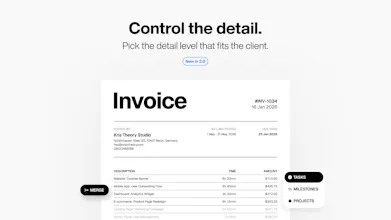
TimeOS 2.0 closes the loop with companion Invoicing app. Hit Load, then Generate PDF and your sessions become line items! Customize the invoice if needed, download the PDF and sent to the client.


Free Options
Launch Team / Built With


TimeOS: The Ultimate Time Manager.
@krisxtheory The gap between time I tracked and time I can defensibly bill is where I lose money every month. Can I attach the actual work artifact to a time entry, so when a client questions an invoice I have something to point at? That's usually the argument, not the hours themselves.
TimeOS: The Ultimate Time Manager.
@arturbrugeman Hi Artur, can I ask what an artifact means to you here?
As the architecture stands, the evidence is the Task. Keep your backlog detailed and don't nest tasks into sub-tasks, and every one of them becomes its own invoice line, so the list can be as comprehensive as you want it.
The alternative is treating the Session as the evidence instead, which would give your client the full breakdown of the month. I'm genuinely unsure whether that builds trust or costs it, which is why I'm asking rather than building.
A second alternative: a separate detailed breakdown of the month, attached to the email as a second PDF or linked to a web version of it. The session list plus a bit of shape to it, days worked, session count, average session length, longest session, time in calls and meetings against focused work. The invoice stays clean and the detail sits beside it.
I do wonder how much trust a document can carry on its own, though.
Tell me what you think about it.
Building on Artur, from having built a small invoicing tool myself. The thing I would want to know before trusting this with real clients is what happens to an invoice after it has been sent.
Notion is mutable and a PDF is a snapshot. If somebody edits or deletes a time entry after the invoice went out, the document your client is holding and the data in Notion now disagree, and nothing reconciles them. Worse, if the invoice recomputes from live sessions, then hitting Load and Generate again next month can produce a different PDF carrying the same invoice number. That is the one thing an invoice must never do, because it is a commercial document rather than a report.
So the question is simply: are line items frozen at the moment of generation, or recomputed every time?
Two related ones that bite everybody who builds this.
Does a session get marked as billed once it lands on an invoice? If Load pulls unbilled time and nothing writes back, the same hours can end up on two invoices, and you find that out when a client notices rather than when you do.
And where does the invoice number come from? If it is a Notion property then somebody can duplicate a row or edit the field, and you get gaps or duplicates. For UK VAT the sequence has to be unique and unbroken, so it wants to be issued by something a human cannot type into.
None of this matters until the month a client queries an invoice. Then it is the only thing that matters.
TimeOS: The Ultimate Time Manager.
@dalemooney Great thoughts, Dale!
Frozen or recomputed? Recomputed. The invoice is live and nothing is snapshotted, which makes iterating before you send it easy. To get snapshots you need to iterate it by creating a new invoice and archiving old one.
Does a session get marked as billed? Yes. A session holds a unique Invoice relation and whichever invoice loads it first claims it, so the same hour cannot land on two invoices. Reset or remove that invoice to free it.
Where does the number come from? Notion's auto-increment ID. The number itself is generated and read-only, so nobody can type into it, and only the prefix is configurable. Gaps only appear if you delete an invoice, so the rule is don't.
In practice you can send today's invoice and keep tracking the same day, and that time rolls into the next period. Create the next invoice so it also covers the overlapping day and hit Load. From there you can move between invoices with the Load button. If you're not ready to create the next invoice yet, switch between them in Notion with the Current View checkbox and wait for the toggle automation to finish.
The contractor is responsible for their own workspace and what's in it.
This is built for a single contractor. There's no teams version yet.
@krisxtheory That is a properly detailed answer, thank you, and the session claiming is better than I expected. A unique relation where the first load wins is exactly right and it rules out the double billing bug that catches nearly everyone who builds this.
Two things I would still press on, and the first falls out of your own answers.
To free a claimed session you said reset or remove the invoice. You also said gaps appear only if somebody deletes an invoice, so the rule is do not. Those two rules point in opposite directions. The moment a contractor bills the wrong hours, the fix you have given them is the exact action you have told them never to take.
Real invoicing avoids that by never deleting. You void: the number stays consumed, the record stays visible, and it is marked void. If a void released its sessions back to the pool you would have the recovery path without ever touching the sequence, and the numbering worry goes away entirely.
Worth checking one thing about Notion's auto increment while you are there. It increments on row creation rather than on issue, so a draft somebody makes and discards has already burned a number, as has any accidental duplicate row. Gaps are not fatal in the UK, but you have to be able to explain them, and "it was voided, here it is" is a much better answer than "somebody deleted it".
On recompute, I take the point that live is better while you are still iterating. The part I would still worry about is after sending. Once the PDF is with a client the invoice carries on moving, and nothing anywhere records what was actually issued. The PDF is the only artefact and it lives in your sent items rather than in the system.
Cheap fix within Notion's limits: when Generate PDF runs, write that file back onto the invoice row as an attachment. You keep the live document and you gain an immutable copy of what went out. In a dispute that attachment is the only thing that matters, and at the moment nothing is keeping it.
TimeOS: The Ultimate Time Manager.
@dalemooney Reset is the recovery path and it deletes nothing. It clears the invoice's sessions and returns them to unbilled, so the number stays consumed and the sequence is never touched. Deleting isn't part of the flow, so the two rules don't pull against each other.
Good call on writing the PDF back to the row. Noted.
That's time saving, but can the invoice be customized with the markings of the business?
TimeOS: The Ultimate Time Manager.
@spyroskapa Hi Spyros!
Your business details do. Name, tax ID, bank and address all come from your Issuer contact in Notion and print on the invoice. A logo aren't in yet, though the logo is planned for the next version.
memi
ooh this is so cool!! does it track your screentimes and stuff so you can show proof?
TimeOS: The Ultimate Time Manager.
@sarveshsea Thanks!
No, and not by accident. Screenshots are monitoring. I'd rather the proof be the work itself, so every line on the invoice is a real task with the hours against it. Never say never, but that's not today.