Text Clarifier AI for Chrome

Text Clarifier AI for Chrome

Instant definitions & simplified explanations for any text

139 followers

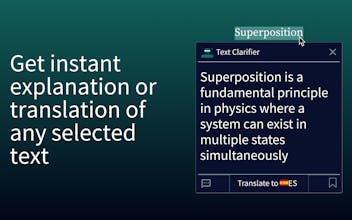
Stop switching tabs to define words. Text Clarifier AI gives you instant, context-aware explanations for PDFs and webpages. Perfect for students, researchers, and language learners who want to read without interruption
Text Clarifier AI for Chrome gallery image
Free Options
Launch tags:Chrome Extensionsโ€ขProductivityโ€ขEducation
Launch Team / Built With
Wispr Flow: Dictation That Works Everywhere
Stop typing. Start speaking. 4x faster.
Promoted

What do you think? โ€ฆ

Alex Efimenko
Maker
๐Ÿ“Œ
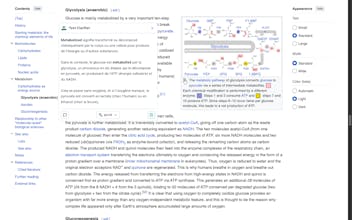
Hey Product Hunt! I built Text Clarifier AI because, as a non-native speaker, I often found that simple translation wasn't enough. I didn't just want to know the word in my native language; I wanted to understand the meaning, the nuance, and the context. The problem with standard translation tools is that they aren't context-aware. They just swap words 1:1, often missing the actual meaning in a specific sentence. I needed something that could explain why a word was used, not just what it translates to. So I built the tool I needed myself. Text Clarifier AI solves this. How it works: Simply highlight any text on a webpage or PDF, and get an instant, simple explanation in a popup. Why it's different: Unlike standard dictionaries, it uses AI to understand context. It knows if "Lead" means a metal or a leadership position based on the sentence. Who it's for: - Students/Researchers: get terms definition and save to bookmarks to memorize later. - ESL Learners: Master idioms and nuance without leaving the page. - We also have a "Deep Dive" sidebar if you want to chat with the text for more detail. I'd love to hear your feedback! specifically: - Does the popup feel fast enough? I spent hours trying to optimize it with different AI models. - Are the explanations too simple or just right? Thanks for checking it out! ๐Ÿ™