
Synopsule
On device private AI meeting transcripts
151 followers
On device private AI meeting transcripts
151 followers
Synopsule records and transcribes your conversations on your Mac or iPhone with Whisper, labels every speaker, and only summarizes when you ask. No accounts, no uploads. Now on the App Store — one $4.99 purchase for Mac and iPhone.


Synopsule
I built Synopsule because every meeting tool I tried wanted my audio in their cloud,
an account, and a bot in the call. I wanted the transcript without the trade.
So the whole pipeline runs on the device that recorded it:
- Whisper transcribes locally. The model ships in the app, so it works offline on first launch.
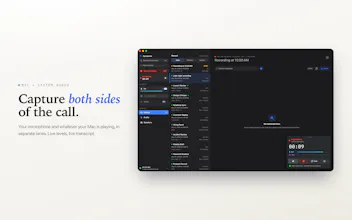
- On the Mac it captures both sides of a Zoom/Meet/Teams call by tapping system audio
directly. No bot, no screen recording, no virtual driver.
- Speaker recognition runs on-device too. It labels who said what, remembers returning
voices across recordings, and learns from your corrections. Raw audio is deleted once
the transcript exists.
Includes MCP functionality so you can integrate your meeting transcripts with Claude, Codex, and ChatGPT.
Summaries are the one thing that can touch the cloud, and only if you ask. Bring your
own key, or run a local model on the Mac so even that stays on your machine. Only
transcript text ever leaves, only when you choose.
It's $1.99 once for both Mac and iPhone. Transcription shouldn't be a subscription.
The hardest part was diarization on long, messy recordings, and making speaker
recognition improve locally without a cloud model.
I'd love feedback, and I'm here all day. What would it take for you to trust an
on-device transcriber over the cloud one you use now?
Refocus
The on-device, no-upload stance is the part I keep coming back to. I work on voice AI for aging-in-place, and the privacy bar gets brutal once you are handling conversations that involve someone's parents or their health. Running Whisper locally so the audio never leaves the machine is a real answer to that. How is the on-device speaker recognition holding up with overlapping talkers or weaker mics? That is usually where local models start to struggle for us.
Synopsule
@igorgurovich Works okay, but the speaker embeddings actually get better over time as you label/identify speakers. Also recognize that it won't be perfect, so trying to keep it easy for users to correct the speakers and have that also improve recognition going forward.
Is this AI-powered search? For example, could I ask it to find all discussions about budgets with a specific person across any conversation from the past year?
Synopsule
memi
On-device transcription with summaries only on request is a refreshing privacy stance for meeting tools. The one-time Mac+iPhone purchase also stands out. How well does speaker labeling hold up in noisy multi-person conversations?
Synopsule
@sarveshsea Works decently well right now, there is also an option within the app for you to toggle the sensitivity of speaker identification. Also, if you label speakers, as you talk to the same person over time, the recognition for that person gets better over time.
on-device is the version people want once they think about who's in the room. the part demos skip is diarization holding across a 60-min call when people talk over each other — no cloud gpu locally.
Synopsule
@qifengzheng The summary/diarization occurs live, but also happens again after the call is over with a stronger model for more accuracy
Straighty.app
Nice, so it works fully offline with Whisper for transcription and some sort of a local Apple LLM?
Synopsule
@lach_p Correct, fully offline with whisper. If you want to do transcript summarization, you have the options of. using Apple LLM or bring your own API key for OpenAI/Claude or you can use our service.
Mailwarm
Does speaker labeling work offline too, or does it need extra processing somewhere?
Synopsule
@karimbenkeroum speaker labelling also works offline!