Stay Focused

Stay Focused

Micro task/time tracker with work-rest balance analytics

18 followers

A simple tool to stay on track when you’re your own boss. It helps: - Break big goals into manageable tasks - Focus on one task to reduce switching costs - Balance work/rest via Focus Mode - Track time spent on tasks & breaks
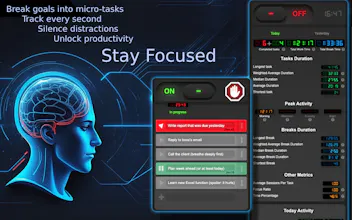
Stay Focused gallery image
Free
Launch Team
Anima Playground
AI with an Eye for Design
Promoted

What do you think? …

Kotik
Maker
📌
A Brief History of Reinventing the Wheel (From the Dawn of Time, Might Be Boring) Programming has been my passion for over 30 years, ever since my father gifted me an Atari 800XL at age 14, and I wrote my own Boulder Dash clone. After university, I shifted to commerce and offline entrepreneurship, while coding remained a "pure passion project," mostly for my own business needs: websites, custom CRM/ERP systems, various apps, and so on. I never actively pursued monetization in IT. Over the years, I accumulated a vast array of software solutions, experience, and a massive codebase. When you’re your own boss or a freelancer, "serious" task managers can feel overkill (even classic Kanban, since there’s no one to review completed tasks). At the same time, you need to plan tasks or at least keep track of them (memos, sticky notes, and notebooks aren’t ideal). I also dislike overly complex interfaces and bloated "all-in-one" solutions. So, I built myself a simple to-do list with task time tracking and a focus on one task at a time. Recently, I needed to create a Google Chrome extension. While diving into browser capabilities, an idea struck: why not turn my time tracker into an extension? This would unlock features like tracking time spent on work vs. leisure sites, helping me self-regulate. For example, monitoring time on productive sites versus distractions. Suddenly, a simple to-do list evolved into a tool for self-control. One week later, my to-do list became an extension. Then, I spent three weeks polishing it, using the extension itself to manage micro-tasks while delaying the release. Over time, the app’s concept solidified as a productivity tool focused on: - Breaking big goals into micro-tasks - Enforcing single-tasking - Splitting time into work sessions and breaks via focus modes - Tracking task durations and break times - Analyzing time spent across websites I showed it to colleagues, but the reception wasn’t what I expected: - A small minority used it as a time tracker; most didn’t care for that feature. - The majority treated it as a replacement for "monitor sticky notes and notebooks" and loved its simplicity. - Some were curious about tracking time on Gmail vs. Facebook, which helped them stay organized. - A few used it as a "soft" site blocker—a reminder to work, not a strict restriction. - Despite aiming for intuitiveness, many users still needed instructions. Each user group wanted the product to dive deeper into *their* specific use case. Post-launch, I realized: - Everyone and their dog makes a to-do list 😅. Few care about yet another one. - To-do apps are simple; there’s little room to "reinvent a better wheel." I tried with a clean UI (for me, at least). - Site blockers are hyper-competitive. Going that route would require strict restriction levels, site groups, schedules—and stray from the original vision. - The core "Stay Focused" positioning is risky. It’s vague, competitive, and attracts users with mismatched expectations. - Users *do* worry about privacy ("Is someone reading my tasks or tracking my porn sites?"). Building trust here is tricky—it’s a "leap of faith." **A Note on Privacy** This is non-negotiable. The extension collects no personally identifiable data, task details, or website usage history. All data stays in the browser’s local storage, inaccessible to developers or third parties. No IDFA/AdID tracking. Only anonymous metrics are used for product direction, like: - Percentage of users who never create tasks - Users who complete tasks without timing - Those using only the site blocker - Other aggregate stats (no individual insights). Even quantitative metrics on visited sites are **not** collected. While writing this, I had an idea: maybe publish a mini-guide on using browser DevTools to inspect what data any extension sends? If time allows, I’ll do it. **Future Plans?** The extension could pivot in many directions: a full site blocker, advanced cross-filtered analytics, a collaborative task tracker, Pomodoro-style work/rest balance, or even Mind Maps. But I don’t want to abandon the core idea of a super-simple, intuitive tool. For now: pause, gather feedback, and refine the concept. With only ~300 users, it’s too early for major conclusions. The next step is adding a feedback form or communication channel before making big changes. That’s the story of my first public product—a Chrome extension. Let’s see if it gains enough traction to justify further development. Any comments, suggestions, or feedback—bring it on! P.S. And apologies for yet another to-do list. 😊
Alex

An excellent extension for those who want to boost their productivity and overcome procrastination. It helps you focus on truly important tasks by limiting the time spent on distracting websites. The interface is simple and intuitive, and I had no trouble with setup. Thanks to this extension, I've become more efficient in managing my time and have noticed a significant improvement in my concentration. Highly recommend!

Kotik
Maker

@alex_morningstar I hope you'll like the upcoming update too.
The next release is planned to include:

- A badge on the current page with the active micro-task

- Updated metrics

- A communication channel for user feedback

- Onboarding

We're trying to create a convenient tool for those who find large, complex time managers overwhelming."

Let me know if you'd like any refinements!

Alex

@kotik01 I’m using your extension as a task list for planning my work during the day. I don’t care about other metrics, such as time tracking for tasks. It would be nice to have some subtle reminder that I’m currently working on a specific task 

Kotik
Maker

@alex_morningstar Yes, that is a difficulty. I often face it too—especially when I close the task panel, I forget what exactly I should be focused on at the moment and end up switching to something secondary. Sometimes, I also switch to another task from the list without updating it in the task manager, which messes up the statistics.

For now, the solution I see is to add a draggable element on the current tab with the name of the active task and the time. This way, it’s always in front of me, but I can still drag it to a convenient spot or disable it. It's a badge that I talking about.

Anthony Adams

breaking down big goals into smaller tasks makes my day feel way more manageable.

Kotik
Maker

@anthony_adams_ Yes, it really works! 🔥
Breaking big goals into smaller steps stops them from feeling overwhelming and shifts your focus to actionable tasks. Every completed task is a mini-victory—it reduces anxiety and gives a sense of progress. Plus, small steps are easier to fit into your routine and prevent you from drowning in the endless 'I need to do everything at once.' It’s like building a house brick by brick—everything adds up in the end, but without the panic.

Why: Your brain sees small tasks as less intimidating, reducing procrastination, while visible progress keeps you motivated. It’s literally a way to "cheat" stress by turning chaos into a clear plan. 😉