
Status Ninja
Sync your Google calendar events to your Slack status
77 followers
Sync your Google calendar events to your Slack status
77 followers
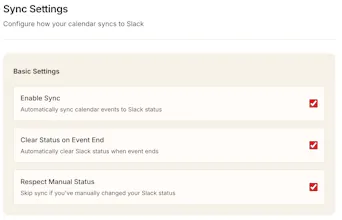
Status Ninja syncs the context of your Google Calendar, including focus time and emojis, directly to your Slack status. It’s designed for people who already time-block and want that information reflected automatically in their Slack status.
Interactive



Free Options
Launch Team / Built With


Floot MCPBuild and ship web and mobile apps inside Claude or ChatGPT
Promoted
Status Ninja
Hello!
I built Status Ninja to improve my working day. I like to time-block my Google Calendar (focus time, lunch, emojis, etc.) but with the available calendar integration Slack only ever shows “In a meeting”. It also doesn't include the fun emojis I like to put, particularly in focus time.
I built Status Ninja to sync from your Google calendar straight into your Slack status. It helps me a lot because my colleagues know what I'm up to (cuts down on people interrupting me) and also it makes my Slack status a bit more lively with nice emojis that I can set.
I’d love any feedback, especially from people who time-block like I do. Happy to answer questions!
Product Hunt
Status Ninja
@curiouskitty great question! There are two main reasons:
The native Google Calendar integration only ever displays "📆 In a meeting". Status Ninja picks up any custom emojis you set in your Google calendar time block. "🎯 Preparing for QBR" looks a lot better than nothing or "📆 In a meeting"
The native Google Calendar integration doesn't pick up focus time blocks. I use these a lot in my work since they are easily distinguishable in the calendar from events. Status Ninja considers all event types if you want it to including out of office.
The main meaningful outcome is that your colleagues can get a bit more detail on what you're currently doing. They might disturb you less if you're focusing.
A secondary outcome is that Slack is a bit more fun. Custom emojis add a bit of variety and personality to the workspace.
Nice idea, syncing actual calendar context to slack feels genuinely useful for teams that time-block. Does it also handle quick changes, like dragging a focus block longer mid-session?
Status Ninja
@david0795 hey David, absolutely we handle that use case. Any changes made will be picked up within a minute
Love this use case. Time-blocking only really works if your team can see and respect it, syncing actual calendar context (and emojis 👀) to Slack feels like the missing piece.
Status Ninja
@mees_schiks You've hit the nail on the head! And having a unique emoji (😤?) in your time block makes people take notice in Slack too
Bookmarkify
Congrats on the launch @lukebray ! Definitely a helpful app to have
Finally! Been looking for a tool for this that isn't Clockwise.
Status Ninja
@zcoleman yes clockwise is a bit much if all you need is Slack status updates!
Interesting indie project. I always forget to set my Slack status to “on vacation” :)