Launched this week

SpendKeep
The Privacy-First Expense Tracker. No Bank Login Required.
40 followers
The Privacy-First Expense Tracker. No Bank Login Required.
40 followers
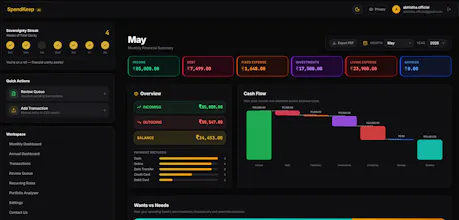
Track expenses without bank sync. AI categorization via email forwarding & CSV import. No PSpendKeep is a privacy-first AI finance tracker. It automatically categorizes expenses by parsing bank SMS and forwarded emails using LLMs—no Plaid or bank sync required. Beyond budgeting, it features an institutional-grade portfolio analyzer that calculates Sharpe ratios, risk volatility, and concentration, complete with personalized AI financial health verdicts.




@abhistha Upvoted. I like the privacy first approach, and using SMS and email instead of direct bank connections is an interesting way to reduce friction while keeping users in control of their data. How do you handle parsing accuracy when different banks change the format of their transaction notifications?
@spotch_founder Hi Nick, thanks for the upvote and the great question!
To answer your question on parsing accuracy: because we use LLMs to parse the transactions rather than rigid, hard-coded rules, the system is incredibly resilient. The AI understands the context of unstructured text, so if a bank tweaks their notification format, the AI still knows exactly how to extract the amount, merchant, and date accurately.
We are actually working on a companion Android app right now to handle this automatically, and it has been showing really good results with the majority of Indian banks!
However, for the web app as of now, we rely more on users uploading their transactions, forwarding their emails, or manually logging them via our AI text prompt. We know this introduces a bit more friction compared to direct bank connections. To offset that and encourage users to build healthy tracking habits, we've gamified the experience! We introduced a 'Data Sovereignty Streak' to reward consistent usage, and a full Rewards structure where users can earn points to unlock premium AI features for free.
We are constantly brainstorming new ideas to help users track their spending habits more efficiently with even less friction, without ever compromising on data privacy. Thanks again for checking us out!"
Feel free to adjust it to match your style! Let me know if you need any other replies drafted.
@abhistha - I like the privacy-first approach of SpendKeep and the no bank login requirement. I notice you have a Sign Up Free link but there is no mention of any pricing structure or subscription tiers listed on the site. This feels uncomfortable to me, as I want to know what I am signing up for before I give my details. In this time of increasing subscription fatigue, transparency is key. Could you perhaps clarify what the free tier includes and if there are any paid options available?
@codeandsea Hi Brent, thanks so much for checking us out and for the honest feedback! You raise a very fair point about subscription fatigue and transparency—we completely agree, and we are working on adding a dedicated pricing page to the site ASAP to make everything crystal clear before sign up. However, there is a dedicated pricing section on the landing page just above the FAQ's
To answer your question, SpendKeep operates on a Freemium model:
The Free Tier gives you full access to our core privacy-first expense tracking and manual entry. Because our AI infrastructure (for parsing emails, analyzing receipts, and generating portfolio insights) incurs hard server costs, we place monthly usage limits on those specific automated AI features.
The Pro Tier removes those limits entirely, giving you unlimited access to all AI tools and advanced insights.
However, we know not everyone wants to pay for another subscription. That's why we built a unique Rewards System directly into the app. Free users can complete simple community tasks (like sharing on social media, writing a testimonial, or reporting bugs) to earn points. You can then use those points to redeem extra AI limits and unlock premium features without ever spending a dime!
Hope that helps clarify things, and thanks again for pushing us to be more transparent—we'll get that pricing page up shortly!
@codeandsea No problem at all. Really appreciate feedbacks and ideas.
If I understood correctly, this AI agent needs access to SMS?
@masterbek Hi Ulugbekmirzo!
Not necessarily! The current web app doesn't need (and can't access) your SMS. You remain in complete control of your data—you can manually log expenses, paste in transaction text for the AI to parse, or forward your digital receipts via email.
However, for users who want a fully automated 'set-it-and-forget-it' experience, we are currently building an optional companion Android app. That app will read transaction SMS and push notifications locally on your device to log expenses automatically, which is a great way to avoid handing over direct bank credentials.
So it's completely up to you and how much automation you prefer!