Slack Vibe 🎉

Slack Vibe 🎉

Open source analytics for Slack

1 follower

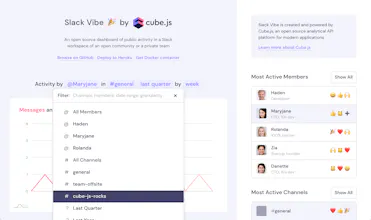
Slack Vibe 🎉 is an open-source dashboard of public activity in any Slack workspace. Add it to your favorite Slack community and let metrics tell the story. It's fully ready for self-hosting, deploys to Heroku or launches with Docker in under a minute.
Slack Vibe 🎉 gallery image
Launch tags:Messaging•Open Source•Analytics
Launch Team
Anima - Vibe Coding for Product Teams
Build websites and apps with AI that understands design.
Promoted

What do you think? …

Igor Lukanin
Hey 👋 Igor from Cube Dev, maker of Slack Vibe 🎉 here — One day I ran across a question in our community Slack about calculating analytics... about Slack usage! The developer wanted to know a week by week message count on a particular channel. Surprisingly, there was no way to learn this from analytics built into Slack but it sounded like a no-brainer for Cube.js. So, I decided to build Slack Vibe 🎉, an application that answers all kinds of questions about Slack with data and beautiful visualizations. Slack Vibe is open-source and available on GitHub; built with Node.js, Cube.js, React, and JavaScript. It's is ready for self-hosting, deployable to Heroku in a single click, pre-built Docker image available. I hope that you run Slack Vibe and run your own instance! Definitely do it to get insights about your favorite Slack community or private team. Happy hacking! 🤘
SAI
How does one set the Slack workspace this product analyzes?
Igor Lukanin
@saicrazyfire First, you get a your data exported from Slack as a ZIP archive (https://slack.com/intl/en-ru/hel...), then you run your own Slack Vibe (on Heroku, in Docker, or just locally), and then just upload the ZIP to your Slack Vibe. Voila! In seconds, you get your charts and data :)
Pavel Tiunov
Slack analytics on open source steroids.
guilly K
I didn't know about such opportunity in Slack, thank You
Igor Lukanin
@guilly_k Well, Slack has a built-in analytics dashboard (https://slack.com/help/articles/...), but I think it's no match to Slack Vibe. As far as I can see, Slack Analytics is focused around usage quotas and stuff which is important for billing, and Slack Vibe is focused around community and its activity. So, they both do give valuable info, but answer different kinds of questions :)