SketchAR

Augmented reality + art

33 followers

SketchAR is an application through which the user sees a virtual image on the surface of which they are planning to trace a sketch. SketchAR is commonly used as a g​raffiti creator ​and a tool for ​anime drawing​, though you can apply the technology for all kinds of painting arts.
This is the 8th launch from SketchAR. View more

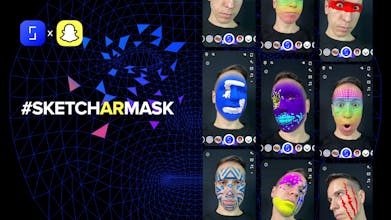
SketchAR Masks for Snapchat

Create your own AR Mask for Snapchat in minutes
The SketchAR Mask Editor lets our users make custom AR lenses on Snapchat in minutes. Tap “Create AR Mask” on SketchAR. You can fill in a special template expressively or step by step. Then, tap “Try Lens”. Finally, transfer the mask to Snapchat.
SketchAR Masks for Snapchat gallery image
Launch Team
ace.me
ace.me
Your new website, email address & cloud storage
Promoted

What do you think? …

Wow! That's stunning!
Andrey Drobitko
@yury_shlaganov Thanks, Yury!
Phil Co
Great Editor! Thumbs up
Andrey Drobitko
@phil_co Waiting for new creative AR masks from you!)
Jennifer Johnson
Great!
Andrey Drobitko
Derrick Carter
Brilliant
Andrey Drobitko
@derrickcarter3 Appreciate it!
Michael Kitamura
This looks really useful, sharing with our whole team!
Andrey Drobitko
@michaelkitamura looking to see your masks with hashtag #sketchARmask!)
Andrey Drobitko
Hey Hunters! We’re excited to announce our new feature — AR Masks — created at Yellow Collabs closely with the Snapchat team. Creativity is not just about drawing, it’s a mindset that involves a suite of tools and techniques we have on SketchAR. Since the launch of SketchAR in 2017, our mission has been and always will be to invent tools that allow people to show what they are capable of doing. The SketchAR Mask Editor lets our users make custom AR lenses on Snapchat in minutes. To see how it works: open our app and tap “Create AR Mask” — a special template will appear. You can fill it in expressively or step by step (it’s a quite pleasant process, actually). Then, if you’re satisfied with the result, tap “Try Lens”. Finally, transfer the mask to Snapchat. Your friends can also use and save your masks. We’re looking forward to your cool lenses made with SketchAR & Snapchat.