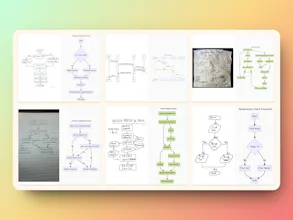
Sketch2scheme converts hand-drawn flowcharts and diagrams into digital formats using AI, recognizing nodes, connections, text and auto-arranging elements. Export your work to PNG, SVG, PDF, or edit results with Draw.io or Mermaid code.
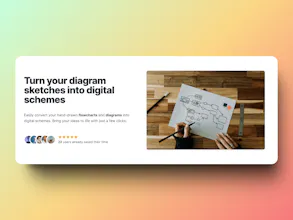
I am excited to share with you a tool I recently created - Sketch2scheme. ✍️✨ Sketch2scheme allows you to easily convert hand-drawn flowcharts and diagrams into digital schemes.
I created this tool when I needed to digitalize several hand-drawn sketches for a system architecture project and found myself wasting a lot of time starting from scratch. That's why I think Sketch2scheme can be helpful for designers, engineers, and project managers who need to quickly turn paper sketches into professional digital diagrams. 🧑💻💡
It uses OpenAI under the hood with Mermaid code, but the results can be edited in Draw.io as well. While modern AI doesn't provide 100% recognition quality, I believe it’s still much better to start more than halfway done and adjust what AI prepared for you rather than crafting from zero. 🚀
Please let me know what you think! 😊
Report
@d3liaz This looks like a really interesting tool, Sketch2scheme! Converting hand-drawn diagrams to digital formats can be a time-consuming task.
I have a couple of questions:
- Can Sketch2scheme handle complex diagrams with various shapes and annotations, or is it better suited for simpler flowcharts?
-Does Sketch2scheme offer any other export options besides Mermaid code and compatibility with Draw.io?
As a developer, I'm curious about the technical aspects. If the project uses open-source libraries, I might be able to contribute to future development.
Overall, Sketch2scheme seems like a valuable tool for anyone working with diagrams. Keep up the great work!
@max_savonin1 Thank you!
Sketch2sheme works with both simple and complex diagrams. The more complex a diagram is (including shapes, colors, and non-standard elements), the harder it is to recognize and the quality may drop. However, it will do its best to provide some positive result even on the complex schemes.
Through the draw.io integration, it supports export to most of the standard image formats like PNG, JPG, WebP and doc formats like PDF, HTML, XML.
I appreciate your support!
I love this! I'm curious if it is just a single attempt, or is there some comparison step where the output is checked for consistency against the input and adjusted?
@jack_michalak It is currently only a single detection step. However, in some rare cases it may fail due to a syntax error, it could be fixed by a 2nd pass, but that means doubling the AI cost.
Report
This is super cool, What are the save options? Would it just be local device or gdrive, onedrive etc?
@vrrinder Thanks! Currently, it is possible to save as local files in PNG, JPG, WebP, SVG, HTML, XML, and PDF format. You can also continue with Mermaid code, which is a bit more advanced format.
Adding cloud options isn't a problem if users are interested :)
Congrats on the launch! Do you have support for bulk import? Also, as an idea, it can be some part of automation when you trigger the conversion using the API and automatically upload the results to a corresponding destination (Dropbox, Google Drive, etc.).
@chandula Thank you! Yes, I can try to recognize a few diagrams. The limitation on the number is flexible, so let me know if you need more time to test it. :)
Report
This looks super useful for digitizing hand-drawn sketches. Curious, does it support exporting to any other formats besides PNG, SVG, and PDF?
@memphys_sk Thank you! The app supports many more formats. It has an embedded draw.io editor, so the export formats include PNG, JPG, WebP, SVG, HTML, XML, and PDF.
Sketch2scheme
Sketch2scheme
Resubscribe
Sketch2scheme
Sketch2scheme
Nebbl
Sketch2scheme
DepsHub
Sketch2scheme
Coinfella
Sketch2scheme
Sketch2scheme