
ScreenGeany AI
Ask AI about anything on your screen with a single hotkey
81 followers
Ask AI about anything on your screen with a single hotkey
81 followers
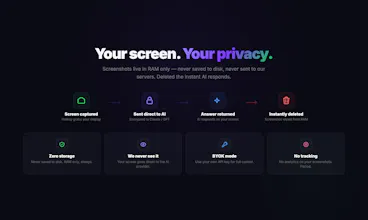
Ask AI about anything on your screen. One hotkey captures your display and gets an instant answer from Claude or GPT — right on top of your current app. No screenshots saved, no copy-pasting, no tab-switching. Free plan: 10 queries/month, no key needed. Pro: 200 queries + BYOK unlimited. Screenshots stay in RAM only — never stored. Supports Claude Haiku, Sonnet, Opus & GPT-4o. macOS 12+.


Free Options
Launch Team / Built With


Customer.ioAutomate Messaging Everywhere — Startups Get 12 Months Free
Promoted
How does the app ensure screenshots are fully cleared from RAM after each query, and is there any independent verification of this privacy claim?
@mordrag Great question, Denis!
Screenshots are captured as NSImage objects held only in memory (RAM). Once the AI responds, the
reference is released and the memory is deallocated — no file is ever written to disk.
The image is sent directly from your machine to the AI provider (Anthropic/OpenAI) over HTTPS. It
never touches our servers.
Really appreciate you asking — thanks!
the 45-second context switch problem is real and annoying. the "stuck on a form field" use case is the one i'd lead with in marketing - it's the most universally relatable. curious whether you're seeing people use it more for quick lookups or longer analytical questions like contract review. congrats on the launch krunal.
Ivo Gospodinov Thanks Ivo! The "stuck on a form field" moment is exactly what made me build this — kept running into it myself. Great call on leading with that.
To your question — it's day one so early to say, but right now it's mostly quick lookups ("what does this mean?", "draft a reply"). Longer stuff like contract review works too since you can ask follow-ups.
Would love to hear what you'd use it for!
This is a nice, simple idea. The “ask about anything on your screen” use case comes up a lot, and having it triggered by a hotkey directly on top of the current app feels pretty natural.
Keeping screenshots only in RAM is also a good call. A lot of people hesitate with screen tools because of privacy concerns. The real test will probably be how fast and accurate the responses feel in day-to-day use.
@konstantinalikhanov Thanks Konstantin! Privacy was non-negotiable — screenshots stay in RAM, encrypted over TLS 1.3, deleted the second AI responds. Nothing stored anywhere, ever.
On speed — responses start streaming in about 2 seconds, and you can switch between Claude and GPT-4o depending on what works best. Give it a try and let me know how it feels!
useful initiative, would be nice to be able to use it on the web version without having to download the app but I understand that there are limitations with that.
@viktorgems Thanks Victor! You're right — a web version would be convenient, but the core experience really
depends on being a native app. Here's why:
The magic is the global hotkey that works across ANY app — your browser, IDE, PDF reader, email
client — without switching context. A web app can only see its own tab, not your whole screen.
That said, we're exploring a Chrome extension that could cover browser-based use cases (forms,
emails, articles). Would that be useful for your workflow?
Appreciate the kind words and feedback!