Every one of us would like to spend less time on distractions. Qbserve can help.
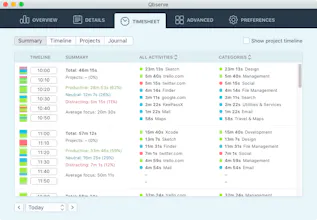
It keeps track of what you do on your Mac and provides constant feedback on your productivity. This way you can stay focused and develop better habits.
It automatically tracks work hours and can generate invoices based on the collected data. No need to remember to start and stop time tracking.
Hello Ivan, amazing idea and execution. Congratz!
Do you able to track websites seperately on Google Chrome Canary? It just tracks my apps but not websites.
@nscmnto@yigitkonur v1.27 is out and it includes a fix for Chrome Canary and Safari Technology preview. Now Qbserve should track sites in all the popular browsers (except for Firefox because it doesn't use native OS X UI).
Report
@ivmirx thank you so much; it is now working properly :)
Hi all! We wanted a really powerful OS X productivity tracker, so we created Qbserve. It tracks apps, their windows, sites, Youtube videos, subreddits, chats in Skype, and teams in Slack. The chat tracking is especially handy in case you work remotely and use the same chat apps for both your clients and friends.
Also as a standalone app Qbserve doesn't require subscription and keeps all your tracked data locally on your machine.
Thanks for your feedback!
Report
@ivmirx What are your plans to compete with RescueTime? RescueTime has a free version with all of the basic features that I'd have to pay for with your app, the only major differences I see are:
1) The privatization of my data
2) Your UI is more appealing
If you add some of the premium features that RescueTime has (input what you were doing offline), then of course $30 is more compelling vs $72 a year.
One of the reasons I really like this app over RescueTime is this: "Differentiate between productive and distractive chats in Skype, Slack, and Telegram, YouTube videos and subreddits". That's something that has been bothering me forever with RescueTime. Hope it works as I expect, trying the product out now :D
@benbowdene for me the other major differences are chat detection and real-time productivity feedback from the icons.
"Offline time" will appear in the next big update, it's already in development. Alerts ("daily goals" in RT Premium) are already present in Qbserve along with reminders (no such thing in RT).
Then we're thinking about data export and integrations, password protection and probably distraction blocker (I recommend StayFocusd for now).
What else would you like to see? Thank you for the feedback!
Report
@ivmirx First, for the "offline time" feature, don't simply do the quick select options like RescueTime does. Instead, allow me to enter a description for the offline activity "Went to school" and then an option to list it as Productive, Neutral, Distractive. If you want to go crazy then allow users to add multiple activities. RescueTime does this weird quick selects menu that simply doesn't work. There are too many possible things that I might have done to put it into 6 quick select options.
"Then we're thinking about data export and integrations, password protection and probably distraction blocker (I recommend StayFocusd for now)" are all great. I would argue though that a distraction blocker is a wasted feature unless you pair it was something like Pomodoro tracking or any other time management system. It's nice to add a feature like StayFocused within the app, but I feel you need to add something extra if you don't want to waste your time. If it's just simply going to be a website blocker then there isn't much value added, I could simply use Qbserve and StayFocused together.
How hard is it to allow real time tracking? Right now it looks like it's on a 15min delay.
@benbowdene thanks again for your input!
Icons are updated once a minute and all the charts and tables are updated when you open the app's window. "15min delay" is a really strange behavior.
Report
Shouldn't the height of bars on the statistics panel be normalised in some way? This (http://jmp.sh/iEoBS9U) could be made a lot more insightful if scaled to the day with the most hours tracked - not to the full 24 hours in a day. The consequence of doing it the latter way (apart from wasting space, since nobody works *literally* 24/7) is that all the days start looking the same, since the bars are so tiny...
@vukovicnikola late reply since no notifications from PH about new comments. :(
We're adding this later as a setting. Probably, a default one. Thank you!
Report
I'm very interested in trying it out and have installed the trial on my machine. As a behavioral scientist in tech, just 2 notes:
1) Qbserve: the discrepancy between what the brain expects (observe) and the Q similar to the O adds a cognitive hurdle that according to some theories actually generates a bit of pain at least in some people. It almost certainly affects the perception negatively and I don't see many positives, I would change the name if it were me but I realize you probably like it :-)
2) For the price asked, extend the trial to at least 15 days if not 30 days: you don't lose potential revenue as it's not a subscription. And people may not realize the benefits of the app in 5 days. It can also demotivate people trying out: "only 5 days of trial to check it, and the week-end is coming, so just 3 week days, well, I won't be able to see what it brings in benefits in just 3 days so no use even trying it out".
@marktisans thank you! The name is already rooted everywhere but anyway I think that a bit higher cognitive load makes it more memorable since it breaks traditional patterns.
I was thinking about extending trial too, 5 days was a rushed decision.
Report
@ivmirx a couple of quick questions after using a couple of hours :-)
1) is it possible to distinguish specific pages within websites and allocate them to different categories? Use case: websites used for different clients but each client has a different URL, so possible to use regex to allocate the same website to each client? Otherwise, not that useful for me at least to know just the websites :-) Distinguishing based on Chrome profiles would be ideal as well, but not required.
2) possible to allocate time spent inside apps to different categories based on folder of the docs? Again, knowing that I spent 1h in Keynote doesn't tell me if it's client work, marketing, admin, etc but the folders would tell that info.
3) in chat, possible to distinguish by contacts? again, distinguishing between personal chats and pro ones, and separating by clients
I may come back when I think of other questions :-)
@marktisans 1) sorry, this will not be easy to add since the tracking is domain-based and all the other URL parts are trimmed.
2) select the app record in the Details, inside the popover there is a "View windows" button and "Show windows as activities" checkbox. Qbserve picks window names (that are usually equal to filenames) of the apps. You can also create custom categories for your clients and assign required windows to them.
3) select the chat in the Details table and change its productivity and/or category in the popover window.




Thinkbuddy AI
QotoQot
QotoQot
QotoQot
QotoQot
QotoQot
QotoQot
QotoQot
QotoQot
QotoQot
QotoQot
SantaHunt
QotoQot