PushShare

PushShare

Get Android notifications on your iPhone & Apple Watch

2 followers

PushShare forwards notifications from one Android phone to another Android phone or to an iPhone. It’s useful for managing alerts from secondary phones, work devices, or keeping an eye on notifications remotely — including on Apple Watch.
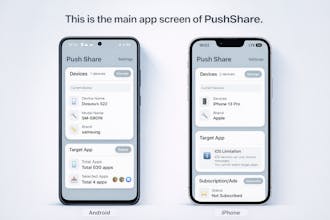
PushShare gallery image
Free Options
Launch tags:AndroidiOSApple Watch
Launch Team / Built With
AppSignal
AppSignal
Get the APM insights you need without enterprise price tags.
Promoted

What do you think? …

Dosusu
Maker
📌
Hi Product Hunt I built PushShare because I’ve been using both Android and iPhone as a mobile developer for years. I also play strategy war games with multiple accounts, often running secondary accounts on an Android phone. The problem was that I kept missing urgent battle notifications coming from my Android device. I wished I could see those Android alerts on my iPhone —or even on my Apple Watch. That idea first came to me about three years ago. I implemented the core functionality early on, but working alone made UI design and planning difficult, so the project was paused multiple times. Thanks to recent AI tools, I was finally able to bring it to life. At first, I searched the app stores for something similar, but couldn’t find an app that did exactly what I needed. So I decided to build it myself. Once I started, I intentionally avoided similar apps to design everything based on my own real usage. The initial goal was simple: forward Android notifications to an iPhone. But during testing, I realized that forwarding *too many* notifications quickly becomes overwhelming. That led me to add app-based filtering, hide system apps by default, and later allow them back when needed. I also added keyword-based filters to surface only the notifications that really matter. While building PushShare, I started thinking about other use cases. Seeing my 9-year-old receive unwanted links on their phone, I wanted a way to monitor notifications remotely. That’s why I added passcode protection and support for showing the original app icon to make notifications easier to identify at a glance. This is my first time launching an app entirely on my own. There are still rough edges, limited testing, and some performance issues to improve. But instead of waiting for perfection, I chose to launch early and improve PushShare based on real user feedback. I’d love to hear how you manage notifications across devices and what use cases you have in mind!