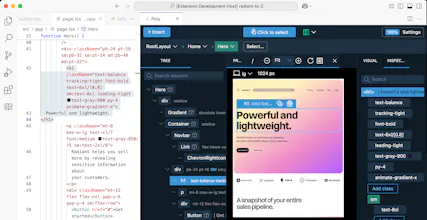
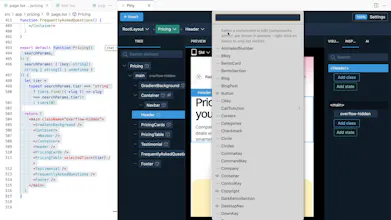
Piny is a visual editor that runs directly in Visual Studio Code, Cursor and Windsurf. It supports Tailwind CSS, Astro, React and Next.js. All edits happen directly in the code, so there are no abstractions, no cloud services and no lock-in.





Free Options
Launch Team / Built With


HTML Planet for Kids
Genius
HTML Planet for Kids
@thedatadavis thanks Chris!
Piny is a clean visual editor inside VS Code and others, supporting Tailwind, React, Next.js, and more. No cloud, no lock-in—just pure code control. Really handy for developers!
Piny seems like a great addition to the development workflow, especially for projects with Tailwind CSS, React, and Next.js! The ability to navigate the project code directly from the browser preview and select elements visually is a huge time-saver. Does Piny Pro support advanced customization for themes or project structures, especially for large-scale projects with complex layouts?
HTML Planet for Kids
@evgenii_zaitsev1 Piny doesn't make any assumption about the project structure, so it should work with most projects.
I see how it could work
Piny sounds like a fantastic tool for developers! With its seamless integration into Visual Studio Code, Cursor, and Windsurf, it streamlines the editing process while supporting popular frameworks like Tailwind CSS, Astro, React, and Next.js. No abstractions, no cloud services—just pure code and flexibility.
This little extension packs a big punch! I've been a Pinegrow Pro user for a long time and am thrilled to see them bringing the power of their visual editor to VS Code. Now, without any complicated setup, lock-in, or anything special to manage, I can visually edit, style, and navigate my Astro projects. Their AI features are also worth checking out. It's clear that they've put in a lot of effort to make the AI features work for you when you need it and get out of the way when you don't. Congrats to the Pinegrow team on another fantastic product!
HTML Planet for Kids
@adamslowe Thanks Adam, glad to hear Piny is useful for you!