
PDF to Google Sheets
PDF tables → live Google Sheets link. No broken columns.
28 followers
PDF tables → live Google Sheets link. No broken columns.
28 followers
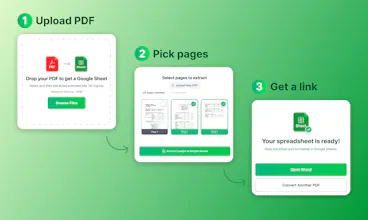
You copy a table from a PDF, paste it into a spreadsheet, and half the columns are wrong. Merged cells break, rows shift. You spend 30 minutes fixing what should've taken 30 seconds. pdf2sheets converts PDF tables into Google Sheets with layout preserved. Works with scans too. Upload → pick pages → get an editable Google Sheets link. Copy to your Drive or download as xlsx or csv. No registration. Files encrypted and auto-deleted.



Free
Launch Team / Built With


ClarifyThe full-stack AI CRM for modern GTM teams
Promoted
@sulimak Congrats on your launch. Do you use human-in-the-loop feedback to improve the algorithm? How do you handle ambiguous or poorly scanned PDFs?
Good job Konstantin! Finally I can covert pdf statements from my poor thai-bank to normal sheets
@tjaydesign Thanks! Some bank PDFs are brutal haha. Let me know if anything doesn’t convert right!